
AVIATION MANAGEMENT SOFTWARE. SIMPLIFIED.
AirOS Product Brochure
AirOS Platform Overview
Aviation operations, airworthiness, maintenance, production, and logistics — in one platform
Curated for Operator · Airworthiness · Maintenance · Manufacturer · Logistics
A curated PDF brochure covering 36 AirOS modules across operator, airworthiness, maintenance, production, and logistics teams. Generated 6 October 2026 from the live AirOS module catalogue — a dated snapshot, not a continuously updating document.
Why AirOS
Mission
AirOS was created with a clear vision — that even in the complex world of aircraft operations and maintenance, the tools that support them can be intuitive, streamlined, and intelligent.
Modularity
AirOS is modular. Aircraft is the central fleet record that other capabilities attach to. You licence the modules you need; optional modules integrate when they share that record, or can sit alongside existing systems via connectors.
Configuration
Standard configuration covers fields, views, workflows, permissions, and organisation settings per module. Bespoke development is available where your approval basis or processes need something the standard product does not provide.
Intelligence
AirOS AURA helps staff find potential compliance gaps, import technical files with catalogue matching, author documentation, and query operational data — with cited sources and human review before anything is applied. It does not certify, dispatch, or release to service.
Operations Control
Mission-control visibility for fleet, crew, and airworthiness.
Dispatch, CAMO, and maintenance control rarely fail for lack of data — they fail because each team maintains a different picture of the fleet. Operations Control unifies geospatial awareness with domain dashboards so accountable managers see fleet, crew, weather, airworthiness, hangar capacity, parts supply, and regulatory alerts together. Atlas provides the map; the Command Centre provides the mission-control layout. Both read from the same aircraft, schedule, and compliance records your organisation already maintains in AirOS.
- Atlas fleet map — Live positions, routes, airspace, NOTAMs, and flight data focus on an operational map.
- Aviation Command Centre — OCC-style dashboard with KPI ribbon, domain severity, and embedded fleet map.
- Incident & regulatory signals — Deferrals, open incidents, compliance gaps, and reliability anomalies on one screen.
- Customisable OCC layouts — User-persisted widget layouts for stand-up, dispatch, and engineering control.
Airworthiness
Continuing airworthiness, continuously managed.
Airworthiness is not a point-in-time check — it is a continuous obligation. AirOS gives CAMOs, operators and maintenance organisations a unified view of fleet airworthiness: programmes, defects, modifications, airworthiness directives, ARC reviews, documentation and compliance status. Instead of chasing information across spreadsheets, email and disconnected systems, your team works from a single source of truth that reflects the current state of every aircraft.
- Fleet airworthiness dashboard — See aircraft status, upcoming requirements and compliance indicators across your entire fleet.
- Airworthiness Review (ARC) — Part-M / Part-CAMO reviews with pre-review packs, ARC-as-a-service document onboarding, AD/SB checks, findings, authorised reviewer sign-off with certification PIN, and freeze-at-issue reports.
- Airworthiness directives — CAMO AD catalogue with type applicability; certified embodiment of a linked modification stamps that AD complied; not-applicable stamps remain available.
- Programme & task management — Manage maintenance programmes, work packages and continuing airworthiness tasks with full traceability.
Aviation Data Exchange
Trusted CAMO–MRO collaboration without losing control.
CAMOs and MROs exchange technical records every day — work packages, embodiment evidence, release certificates, and modification data. Email and ad-hoc portals break traceability. ADX is the structured exchange layer inside AirOS: partners connect once, permissions are scoped, and every copy, merge, and change request is auditable.
- Partner trust network — Handshake partnerships with scoped permissions and branded partner experience.
- CAMO review queue — Structured review of MRO-submitted records and release documentation.
- Compare & merge — Reconcile local working copies against authoritative partner source data.
- Form 1 verification — Fabric trust-network verification for release certificates and authorised release.
Maintenance
From planning to release — maintenance that scales.
AirOS Maintenance brings programmes, work packages, defects and certification into one integrated system. Plan maintenance events, assign tasks, track dependencies and close work packages with full audit trails. AI-powered planning (Maintrol) helps optimise schedules, identify critical paths and forecast long-term maintenance requirements — reducing downtime and improving hangar utilisation.
- Maintenance programmes & forecasts — Revision-controlled programmes with compliance projection and extension workflows.
- Work packages & certification — Plan, execute, and release work packages with CRS, measurements, and audit trails.
- Maintrol & hangar capacity — Gantt planning with critical path, AI task suggestions, and capacity alignment.
- Defects, EOs & material issue — Defect reporting, AD/SB/mod tracking, component work orders, and pick lists.
Regulation Intelligence
Stop preparing for audits. Stay audit ready.
Aviation regulations are constantly evolving. New requirements, revised guidance, approval changes and regulatory findings can consume hundreds of hours each year, leaving organisations reliant on expensive consultants, spreadsheets and manual reviews. AirOS Regulation Intelligence transforms compliance from a reactive exercise into a continuous, automated process. Built specifically for aviation organisations, it continuously analyses applicable regulations, identifies changes, maps requirements to your operation and highlights potential compliance gaps before they become findings.
- Continuous regulatory monitoring — Monitors regulatory publications and updates, identifying changes between revisions automatically.
- Applicability analysis — Determines which requirements apply to your organisation based on your approvals and operation.
- Requirement mapping — Maps regulatory requirements to procedures, records and evidence across your operation.
- Impact assessments — Generates impact assessments when regulations change and tracks compliance actions to closure.
Modules in this brochure
The PDF includes a dedicated module index page with links to each module section.
Aircraft
Central aircraft hub with fleet status, configuration, airworthiness review validity, AD compliance, and AI Import of entire technical files.
Document Control System
Controlled documents with S1000D technical publications, AI Import (catalogue matching + EFB scan), bulk OCR of 1000+ manuals, distribution, and a full audit trail.
AirOS AURA
Aviation Unified Regulated Assistant — chat, agentic voice, AI Import with catalogue matching, deep research, and AI Inbox.
AI Inbox
Operational triage with AI recommendations — review, approve, or decline actions from your live data.
Regulation Intelligence
Continuous regulatory monitoring, applicability analysis and compliance readiness — stay audit ready, not audit preparing.
Airworthiness Review (ARC)
Part-M / Part-CAMO airworthiness review certificates — in-fleet reviews, ARC-as-a-service document onboarding, findings, authorised reviewer sign-off with certification PIN, and audit-ready reports.
Airworthiness Directives
CAMO AD catalogue with type and aircraft applicability, modification embodiment, not-applicable stamps, and ARC AD/SB qualifying checks.
Maintenance
End-to-end MRO/CAMO maintenance — programmes, work packages, defects, engineering orders, AMP and MRO AI Import, Maintrol planning, and competency.
Reliability Monitoring
Fleet reliability intelligence — KPIs, part-level trends, anomalies, known issues, and CAPA in one hub.
Scheduling Engine
Constraint-based fleet and hangar optimisation with OR-Tools, schedule scenarios, and a path into multi-year long-term capacity.
Long-term Capacity
Multi-year fleet maintenance planning — hangar pressure from manpower hours, scenarios, cost, powerplant/LLP, and optimised waves applied back to the schedule.
Aviation Command Centre
Customisable OCC dashboard — fleet, crew, weather, airworthiness, maintenance capacity, parts supply, and regulatory alerts in one mission-control view.
Atlas & Maps
Mission-control mapping for fleet position, flight planning, airspace, NOTAMs, and landing-site survey — integrated with schedule and flight data monitoring.
Flight Log
E-techlog and flight operations — scheduled sectors, load sheet, Apple Wallet boarding and crew passes, offline native app, and CRM flying-time invoices.
AirOS App (EFB)
Native iOS and Android Electronic Flight Bag — offline e-techlog, Apple Wallet boarding and crew passes, document scanner, SMS incident fallback, and optional line-worker alarm.
Schedule
Integrated operational and maintenance planning — fleet scheduling, predicted arrivals, hangar capacity, crew rostering, and FTL validation in one calendar.
Flight Time Limitations
Duty and flight time validation integrated with rostering and scheduling for regulatory compliance.
Mass & Balance
Record aircraft weighing measurements and generate weighing reports and load-sheet manifests from entered data.
Flight Data Monitoring
Ingest, visualise, and analyse recorded flight data — plugins, OpenMCT viewer, baselines, anomalies, and forecasts.
Incident Management
Rapid AOG and incident reporting — web, native app, and SMS when the device has no data — with real-time notifications and AI-assisted coordination.
Safety Management System (SMS)
Dedicated safety management for hazards, safety reports, risk assessment, EFB line-worker alarms, and regulatory SMS compliance.
Management of Change
Structured change control with risk assessment, approvals, impact detection, and audit packs.
Competency Programmes
Training compliance parallel to maintenance — campaigns, forecasts, and schedule-linked competency flights, with Part-147 course delivery in Training.
Training (Part-147)
Approved training organisation software — course hubs, exams and marking, seats and commerce, CRM forms, meeting assistant, and authority report form numbers.
Aviation Data Exchange (ADX)
Trusted CAMO–MRO data exchange — Form 1 verification, read-only partner copies, compare-and-merge, and change-request collaboration across organisations.
Customer Portal
Branded owner and customer portal — aircraft status, technical records, quotes and invoices, training seats, owner booking with map confirmation, and Apple Wallet boarding.
Production Programmes (POA)
Part 21 production routing — certified build standards, production work packages, travellers, concessions, and POA build traceability.
AirOS Distributed UTM
Distributed UTM concept — Unmanned Traffic Control Zones (UTCZ) for uncrewed aircraft, with hardware and national integrations in development.
Modifications
Modification build standards and embodiment — linked to airworthiness directives so certified embodiment stamps AD compliance on the aircraft.
Inventory & Stores
Aviation parts inventory — multi-location stores, stock transfers, pick lists, shelf-life control, and procurement integration for Part-145 and CAMO teams.
AirOS IoT
Optional hardware: UHF RFID and BLE e-ink tags for tooling, onboard equipment, and logistics — in development, with software asset records available now.
Procurement
MR → PR → PO with goods receipt, three-way match, supplier quotes, and procurement automation.
CRM & Commercial
Aviation CRM for mixed customers — operators, owners, CAMOs, parts buyers, and training students — with pipeline, P&L, inbox, forms, and one-step selling.
Communications Hub
Team messaging with channels, DMs, entry threads, media, and AURA — plus service request ticketing.
Assets
Tooling and equipment tracking with calibration status, eDisplays, NFC tagging, and maintenance scheduling.
Roster
Advanced personnel rostering system with certification tracking and workload optimization.
Module details
Aircraft
Aircraft is the essential central module — the fleet record other AirOS capabilities attach to. Use it for operational status, configuration, airworthiness review (ARC) validity, AD compliance on the aircraft, maintenance and flight history, mass and balance, and the technical file.
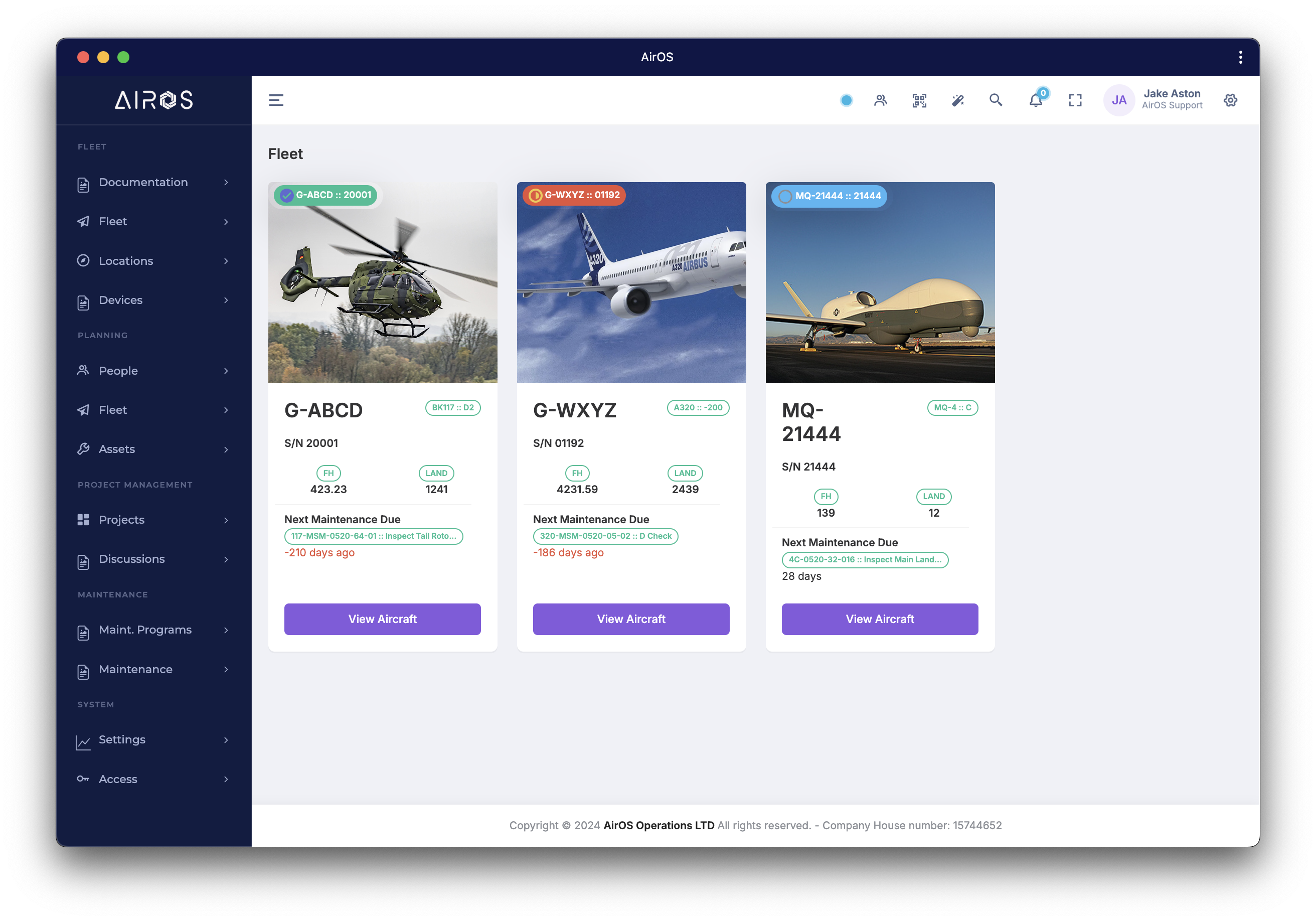
- Aircraft Dashboard — Comprehensive overview of aircraft status, maintenance, and operations
- Operational Status — Real-time aircraft availability and operational readiness indicators
- Maintenance History — Complete maintenance records and upcoming requirements tracking
- Flight Records — Access all flight logs, routes, and operational data
- Document Management — View and manage all aircraft-specific documentation
- Performance Data — Access performance charts and operational parameters
- Mass & Balance — Current weight and balance information with historical data
- Flight Data Monitoring Integration — Real-time and historical flight data visualisation
Document Control System
Store, author, distribute and track essential airworthiness, operations and maintenance data — your single source of truth with revision control and audit-ready transmittals. Technical publications can be authored as S1000D data modules (structured sections, change tracking, and approve/reject) alongside rich-text documents.
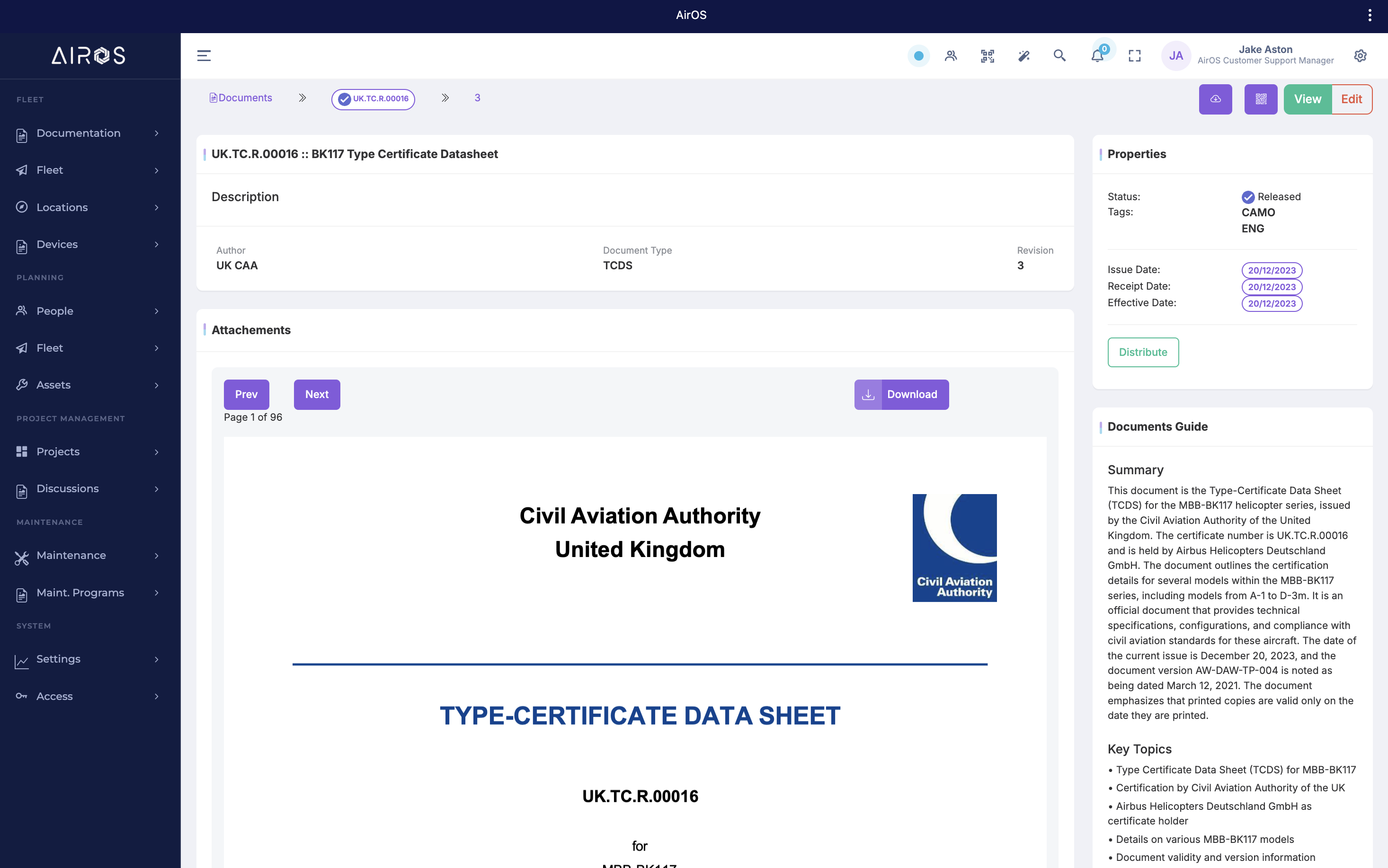
- Revision Tracking — Track document revisions over time
- Comments & Discussion — Comment on and discuss documents within the system
- Distribution & Receipting — Distribute to internal and external contacts and receipt via email or QR codes
- Audit Reporting — Track distributions and generate audit-ready reports
- AI-Assisted Authoring — Create and revise documentation with AirOS AURA
- Smart Import — Upload PDFs and DOCX with AI extraction, suggested catalogue links, and discard of failed drafts — single documents or small in-browser batches
- EFB Document Scan — Native camera page-detect and crop adds PDFs to document import from the hangar floor or ramp
- Bulk Manual & Procedure Import — OCR 1000+ scanned manuals and procedures into structured publication sections — ZIP upload, manifest mapping, and review-before-apply
AirOS AURA
AirOS AURA (Aviation Unified Regulated Assistant) is your intelligent AI layer across the platform — not a bolt-on chatbot.
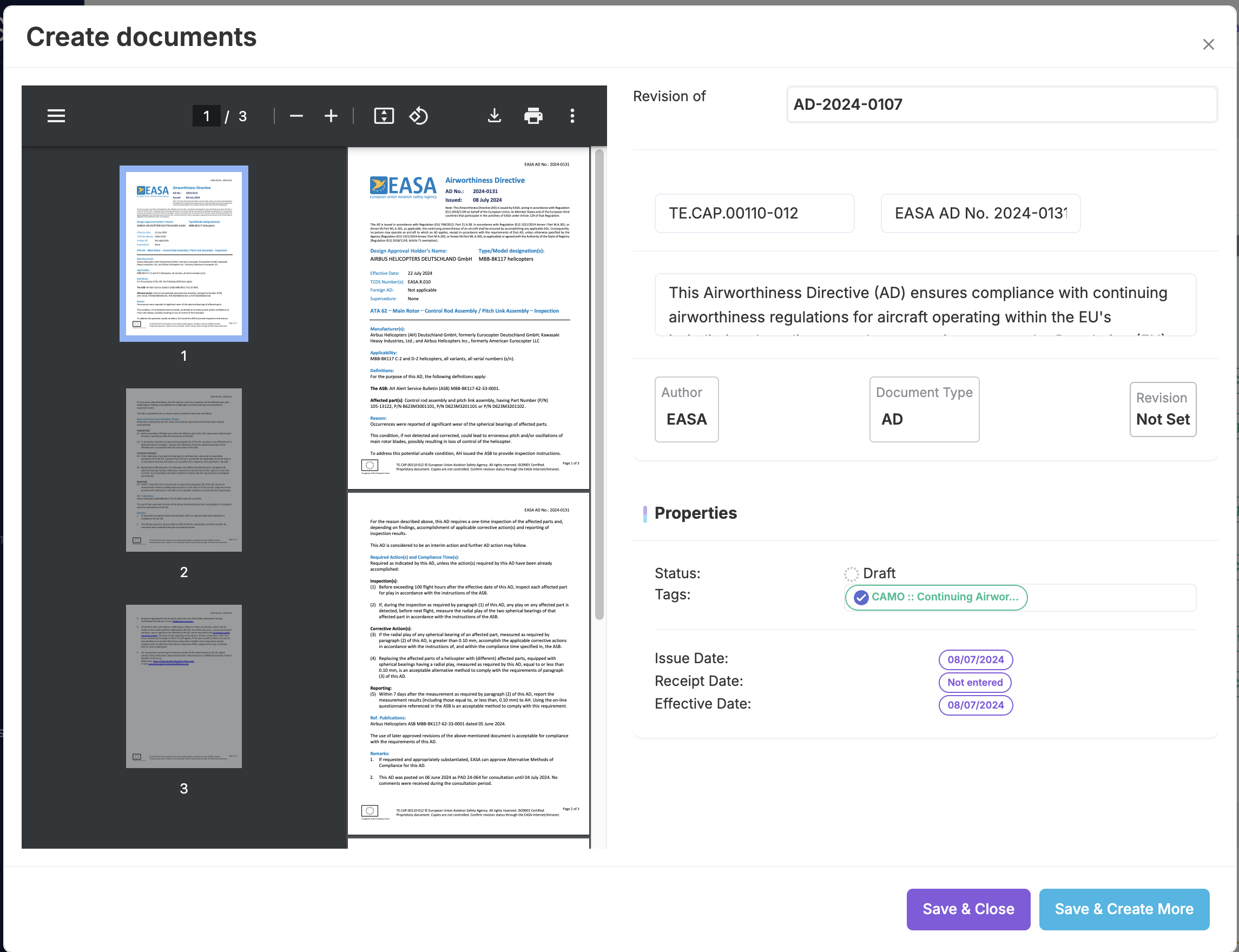
- Document authoring — Assist, Deep Research and Notebook modes for manuals, publications and compliance documents
- AI Import & Catalogue Matching — OCR certificates, ADs, manuals, and mixed files — match types, aircraft, and named references, review suggested links, and discard failed drafts
- Aircraft, Assembly & AMP Import — Onboard entire technical files, nested engine or assembly packs, and OEM AMP / MPD / ALS task catalogues with specialised OCR passes
- Organisational Chat — Ask questions about your AirOS data and receive answers grounded in cited operational or regulatory sources, for staff to verify before acting
- Deep Research — Build researched documents from a topic with multi-section templates and saved drafts
- Document Comparison — Compare documents or revisions and receive structured summaries of what changed
- Agentic Voice Assistant — Hey AURA wake word with live tools — search, fleet status, page actions, weather and NOTAMs — plus cited sources and on-page guidance
- AI Inbox — Triage and action recommendations from operational data with permissions and mobile support
AI Inbox
AURA doesn't only answer questions — it surfaces what needs attention. AI Inbox analyses operational data and delivers triaged recommendations: maintenance follow-ups, compliance gaps, document actions, and more.
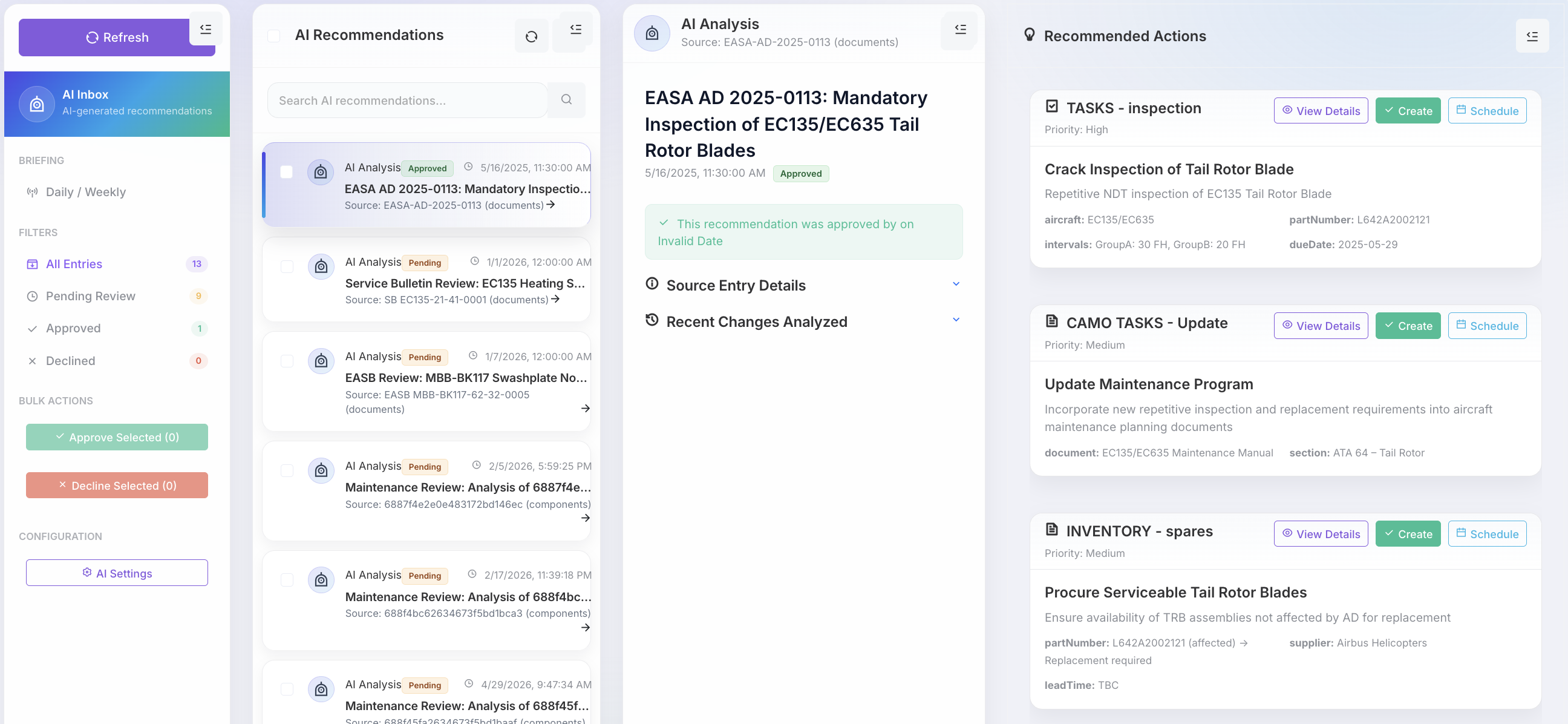
- Smart Recommendations — AI-generated actions from maintenance, compliance, and operational signals
- Approve / Decline Workflow — Permission-aware review before recommendations become system actions
- Briefing Audio — Optional audio summaries of pending inbox items for busy managers
- Context-Rich Cards — Each recommendation links to source entries, documents, and evidence
- Scheduled Analysis — Background jobs keep recommendations current as your operation changes
Regulation Intelligence
AirOS Regulation Intelligence transforms compliance from a reactive exercise into a continuous, automated process.
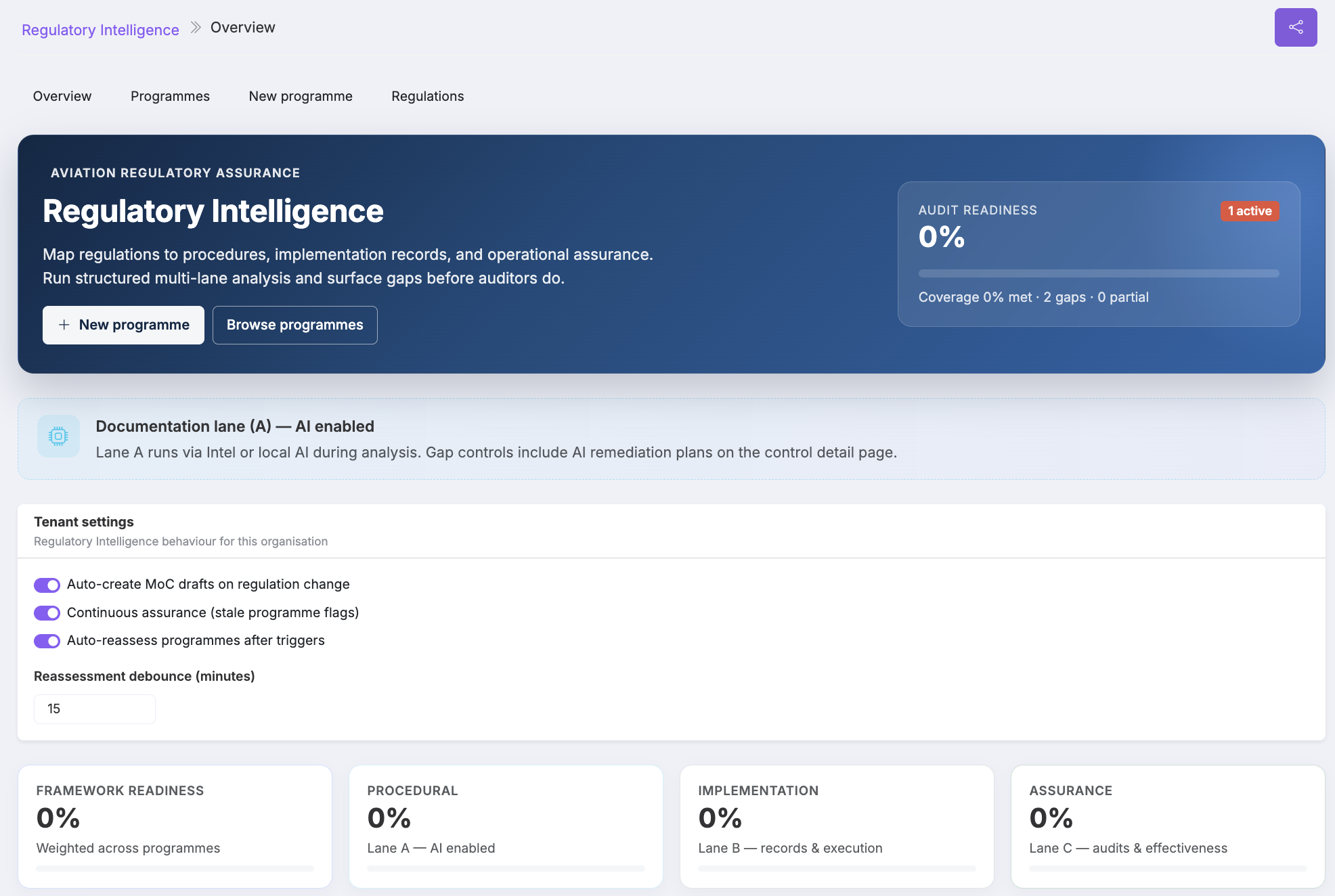
- Regulatory Monitoring — Continuously monitors regulatory publications and identifies changes between revisions
- Applicability Analysis — Determines which requirements apply based on your approvals and operation
- Requirement Mapping — Maps regulatory requirements to procedures, records and evidence
- Impact Assessments — Generates impact assessments when regulations change
- Compliance Actions — Tracks compliance actions from identification to closure
- Approval Readiness — Builds compliance frameworks and highlights approval readiness gaps
- AURA Regulatory Assistant — Ask regulatory questions and receive answers backed by your organisational data
- Audit Readiness — Continuously links compliance evidence to operational records and documentation
Airworthiness Review (ARC)
Airworthiness Review Certificates are a continuing airworthiness obligation, not a paperwork exercise. AirOS ARC Reviews give CAMOs a structured M.A.901 / Part-CAMO workflow: pre-review data packs from live defects, overdue compliance and components; documental and physical survey checklists; AD/SB qualifying checks against the airworthiness directives catalogue; findings with disposition; then authorised reviewer sign-off. Issuance records the reviewer, uses their certification PIN as authentication, writes an audit history, and updates the aircraft airworthiness-review record.
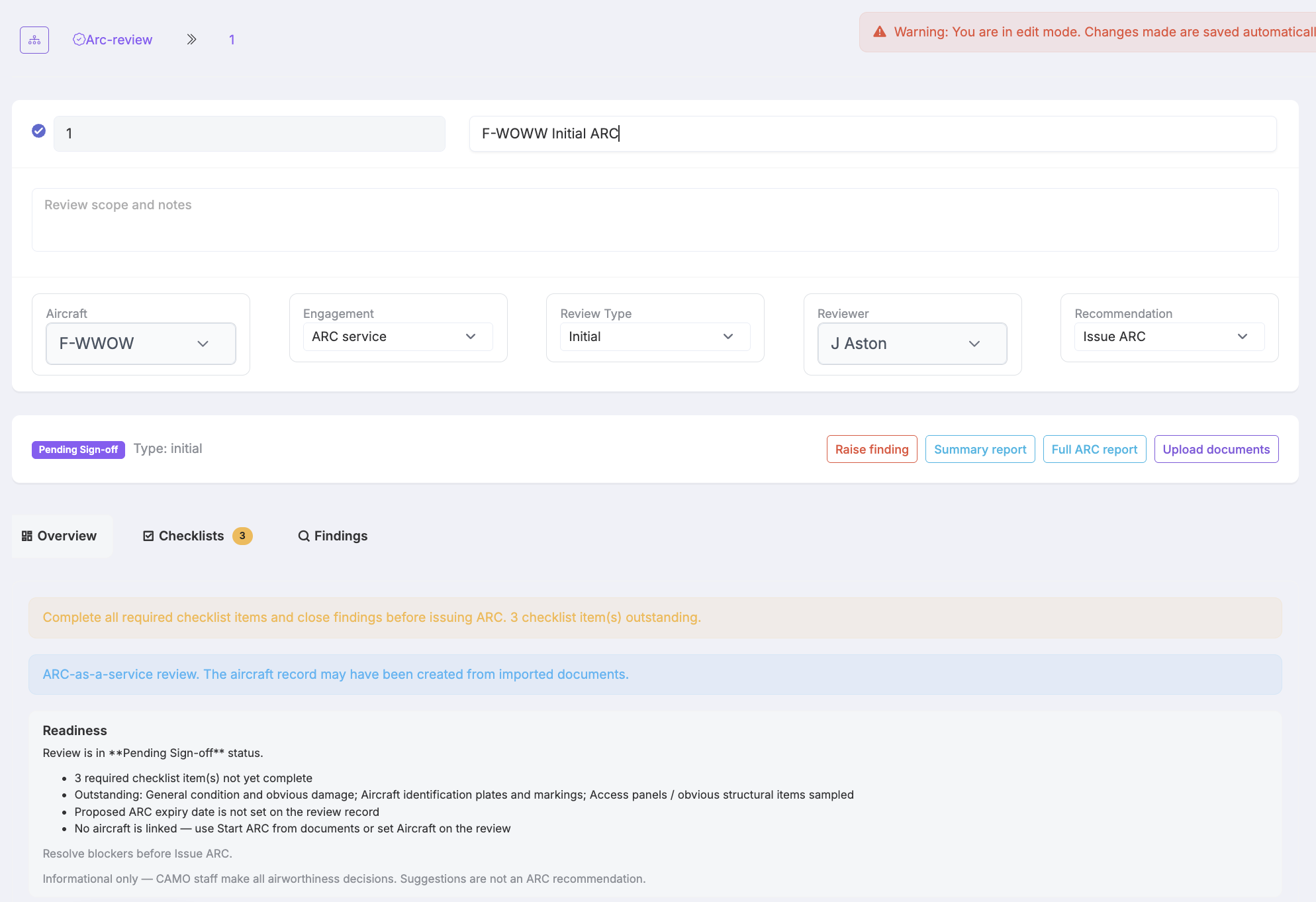
- In-fleet pre-review pack — Live defects, overdue compliance, and component picture attached to the aircraft before the survey starts
- ARC-as-a-service onboarding — Start a review from operator technical-file PDFs or ZIP — OCR classifies documents and builds the aircraft evidence pack
- EFB document scanner — Native camera scan with page detect and crop adds PDFs to the same ARC import from the hangar floor
- Documental & physical checklists — Hangar-ready tabs with large tap targets; evidence-based ticks must be confirmed by the reviewer
- AD/SB qualifying checks — Outstanding catalogue ADs (and linked SB/modification status used in the check) block ARC readiness until each item is complied, marked not applicable, or embodied via a linked certified modification. Recurring or due-dated programme tasks remain on the maintenance forecast — this check is AD/SB catalogue state, not a substitute for AMP due items.
- Findings & sign-off — Raise findings from suggestions or survey notes, disposition blockers, then request CAMO sign-off
- Authorised issuance — An authorised reviewer signs off the ARC; the certification PIN authenticates that person, the action is written to audit history, and the aircraft record is updated
- Summary & full reports — Printable reports that freeze identity, recommendation, checklists, findings, and OCR evidence used at issue
Airworthiness Directives
Airworthiness directives belong in the continuing airworthiness record — not a side spreadsheet. The AirOS Airworthiness Directives domain is the CAMO catalogue of ADs: draft, current, superseded, and cancelled statuses; type-level applicability that adds outstanding fleet aircraft of that type; and per-aircraft complied, certified, or not-applicable stamps.
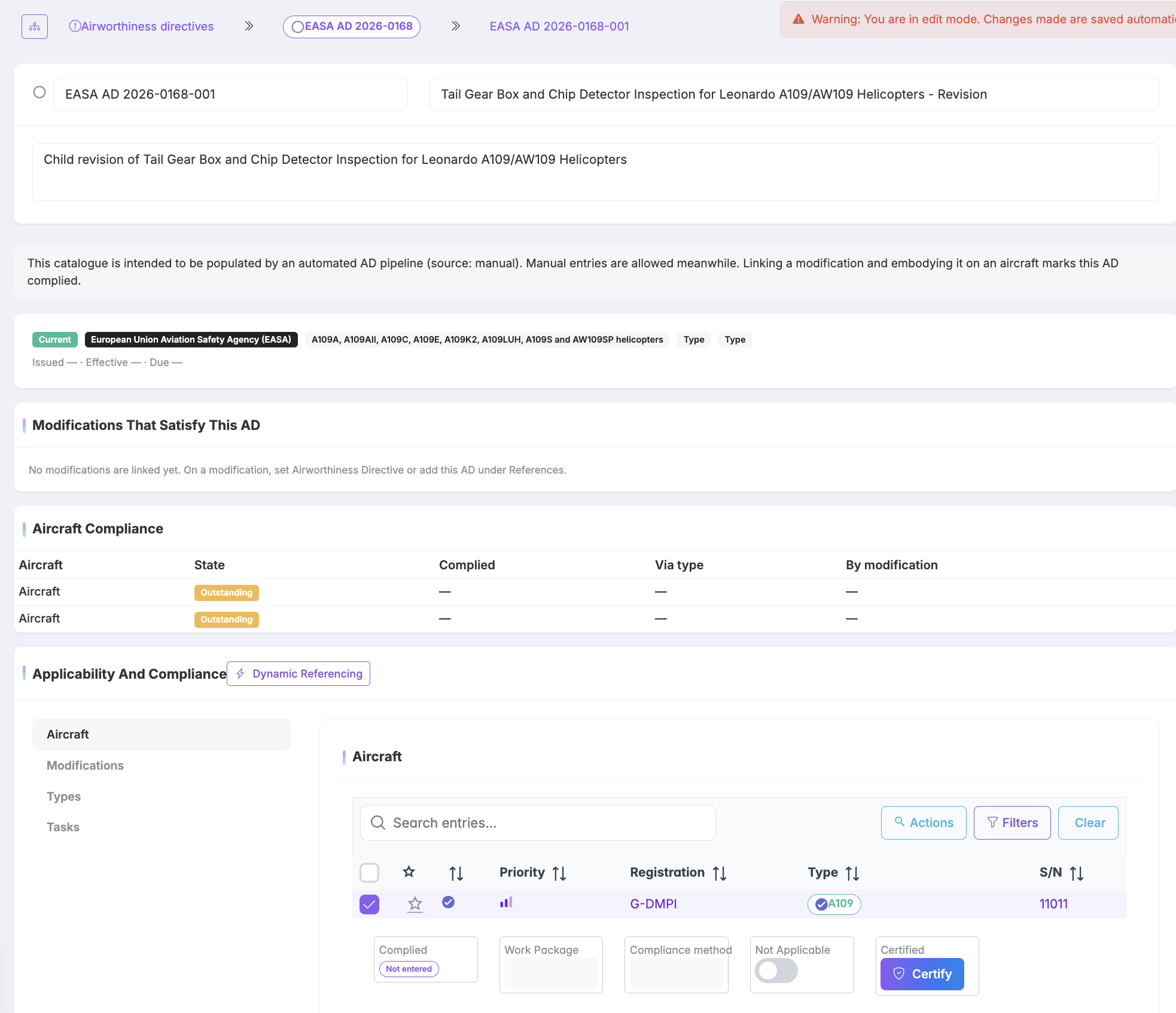
- AD catalogue — In-force, superseded, and cancelled airworthiness directives as first-class CAMO records
- Type & aircraft applicability — Adding a type toggles outstanding aircraft of that type onto the AD; specific registrations can be linked from the document
- Modification embodiment — Certified embodiment of a modification that is linked to an AD stamps that AD complied on the aircraft. Unrelated ADs and uncertified work are left outstanding
- Not applicable stamps — Mark an AD N/A on an aircraft when it does not apply — with the same audit discipline as compliance
- AI Create from the AD PDF — Extract product type, registrations, and named modifications; review suggested links and discard failed drafts before save
- ARC AD/SB checks — Outstanding applicable ADs block ARC readiness and surface as suggested findings until complied or marked not applicable. The check assists the reviewer; it does not issue the ARC
Maintenance
Manage the full maintenance lifecycle: programmes and forecasts, work packages with release and certification, defect reporting and deferral, engineering orders (ADs, SBs, modifications, repairs), and component work orders with material issue.
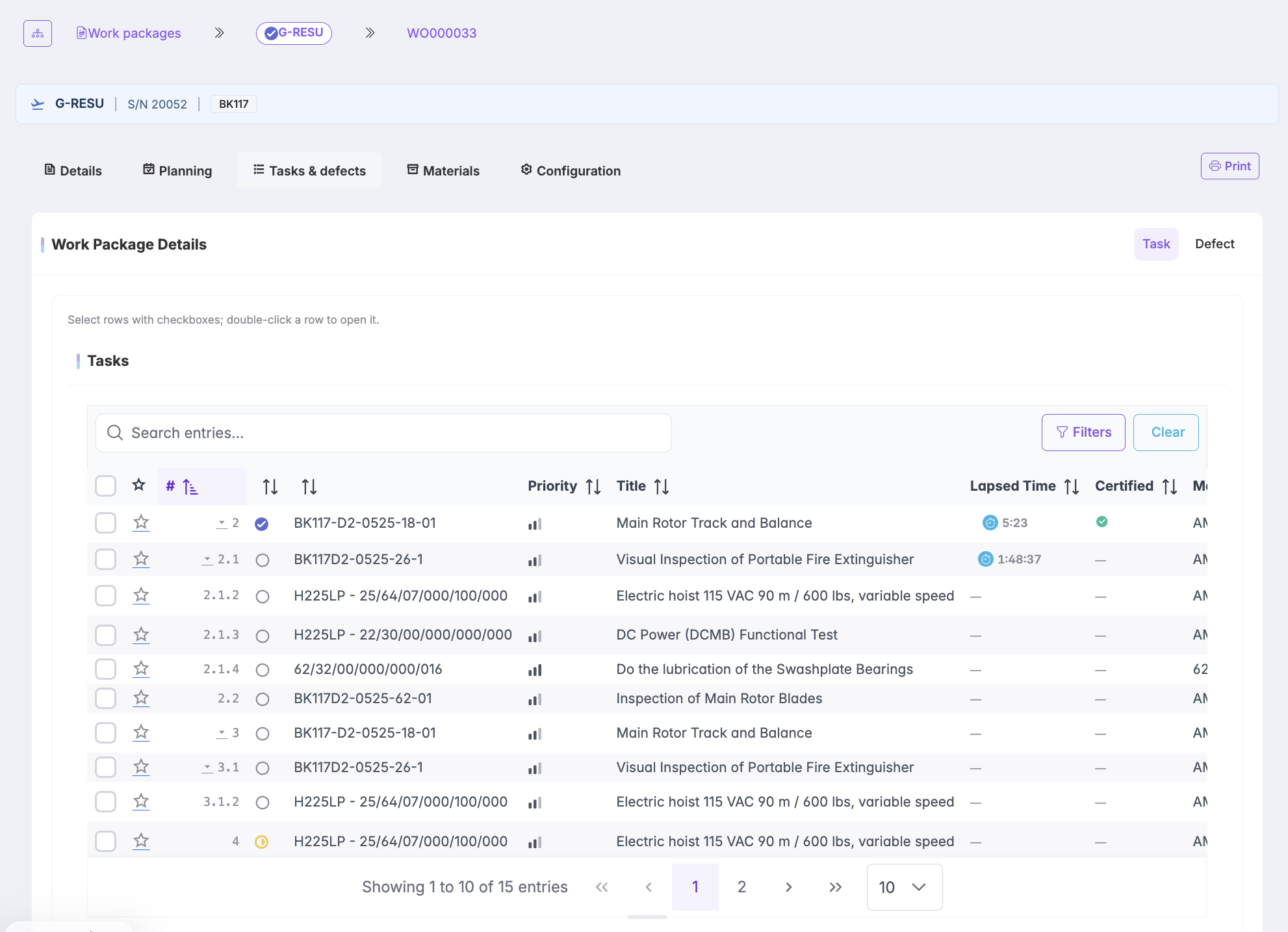
- Maintenance Programs — Define and manage maintenance programs with revision control and active program selection
- Work Packages — Create and manage work packages with task parameters and compliance tracking
- External MRO Workscopes — Certified workscope documents from work packages with AMM references, PDF distribution, and MRO acknowledge/decline
- AI Maintenance Planning (Maintrol) — AI assistant for planning and optimizing maintenance with critical path analysis
- Task Dependencies — Visual task dependencies and blocking relationships for work packages
- Defect Reporting — Report and track defects with voice control and comprehensive measurements
- Engineering Orders — Track ADs, SBs, modifications, and repairs with embodiment workflows
- Task Wizard — AI-assisted task drafting from uploaded documents and manuals
Reliability Monitoring
Turn maintenance data into reliability intelligence. AirOS Reliability Monitoring gives quality and engineering teams a dedicated hub for fleet KPIs, part-level trends, anomaly detection, rogue units, no-fault-found analysis, and monthly reliability reporting.
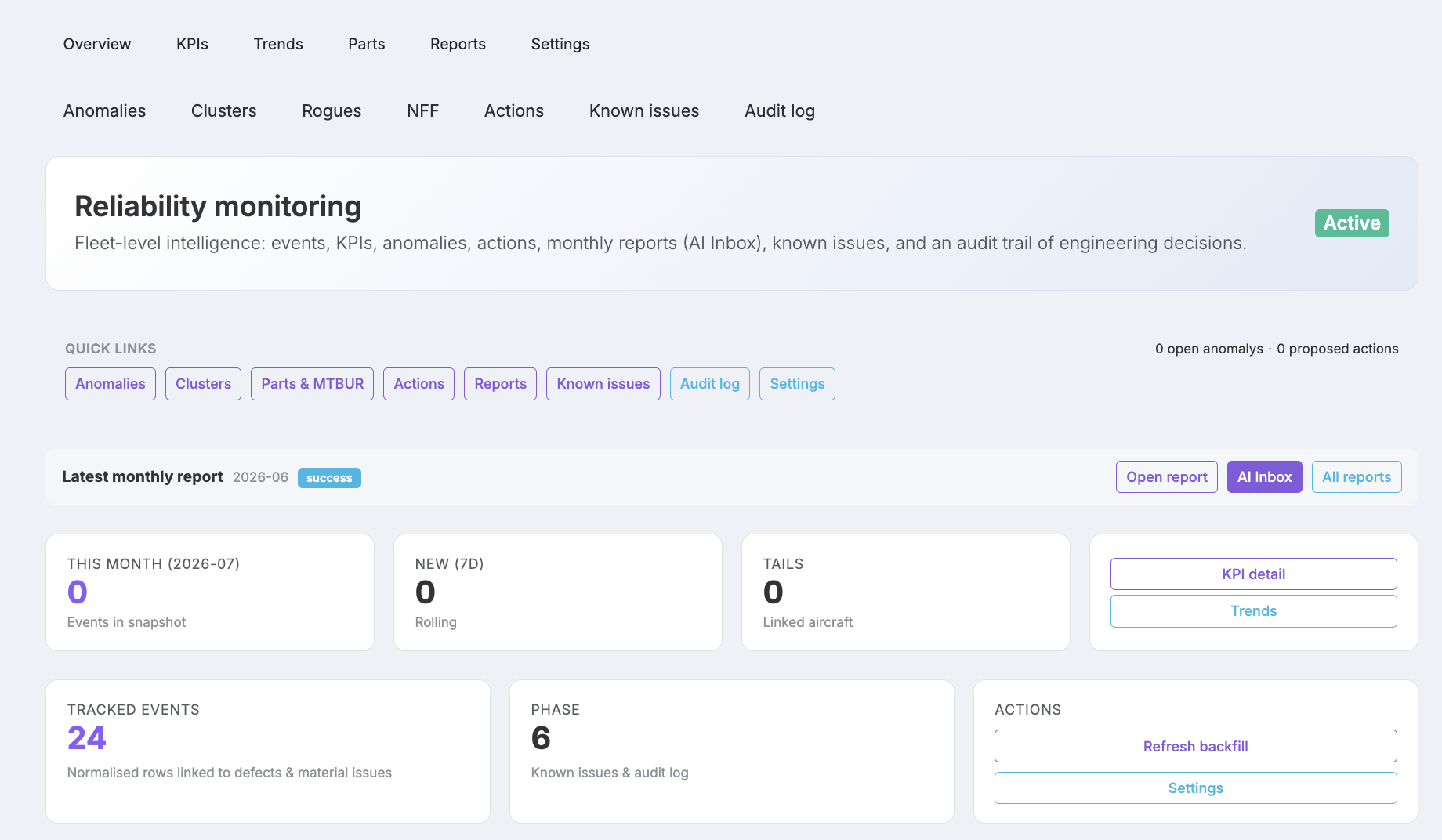
- Reliability Hub & KPIs — Fleet-wide reliability dashboard with configurable KPIs and trend views
- Part-Level Analytics — Drill into parts catalogues, removal rates, and part detail histories
- Anomalies & Clusters — Detect unusual patterns and group related events for investigation
- Rogues & NFF Analysis — Identify repeat offenders and no-fault-found trends across the fleet
- Known Issues — Promote and track known issues with structured lifecycle management
- Actions Board & Reports — Reliability CAPA tracking and monthly report generation
- Audit Log — Full traceability of reliability configuration and analysis changes
Scheduling Engine
Go beyond the operational calendar. The AirOS Scheduling Engine uses constraint-based optimisation (OR-Tools) to propose fleet and maintenance schedules that respect certifications, capacity, and operational rules. Proposals are reviewed before they replace the live Schedule.
- Constraint optimisation — OR-Tools constraint solver for fleet, crew, and maintenance scheduling proposals — planners review before publish
- Draft schedule versions — Copy, compare, and publish schedule scenarios before they become the live calendar
- Hangar & Engineering Capacity — Visualise and optimise hangar slots and engineering team capacity
- Scenario Analysis — Compare schedule versions side-by-side with impact summaries
- Maintrol Integration — Connect optimised schedules with work package planning and critical path
- Reflow & Proposals — Generate and review scheduling proposals when constraints change
Long-term Capacity
Near-term hangar slots are not the same problem as a five-year maintenance wave plan. AirOS Long-term Capacity is a multi-year planning workspace for programme what-ifs, hangar pressure, cost, and powerplant or LLP coverage — without replacing regulatory compliance recalculation or your approved maintenance programme. It is not the operational calendar (Schedule), the constraint solver (Scheduling Engine), or personnel shifts (Roster).
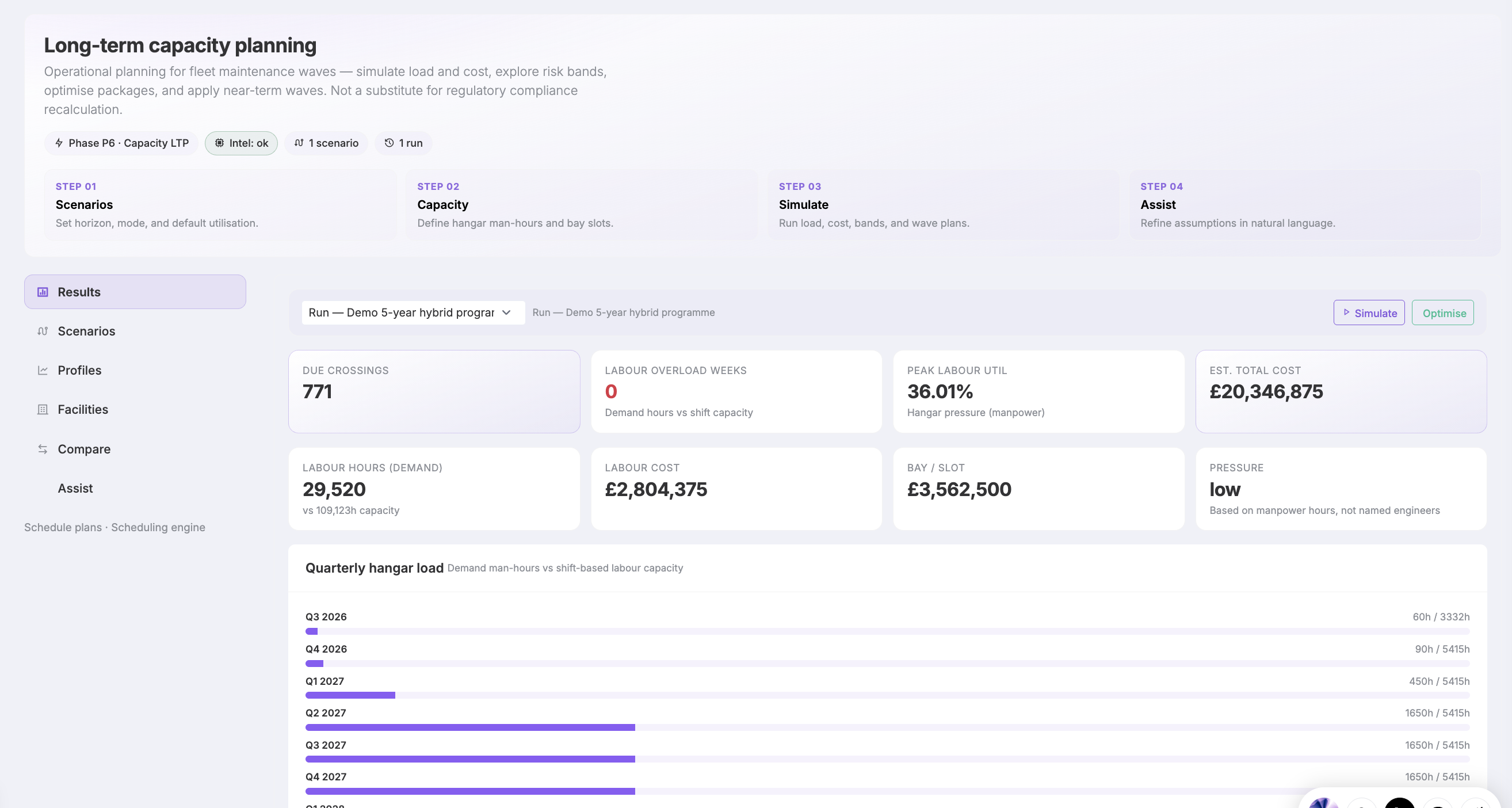
- Multi-year scenarios — Programme what-ifs with utilisation profiles, schedule-plan, or hybrid simulation
- Hangar pressure — Demand man-hours versus facility shift × headcount labour — quarterly load and overload KPIs
- Optimised maintenance waves — Pack dues into waves under hangar capacity, then apply the next 90 days to the live schedule
- Cost & skill hours — Labour, bay, parts, and downtime KPIs with quarterly cost and skill-hour demand
- Powerplant & LLP — Removal timeline, spare pool coverage, and lease / EIS / EOL scenario fields
- Risk bands & shocks — Best / likely / worst availability plus bay-offline, utilisation, and shop-TAT templates
- Capacity Assist — Ask what-if questions, review suggested plan changes, and re-simulate before committing the plan
Aviation Command Centre
Accountable Managers and operations controllers need a single screen that reflects operational reality — not eight browser tabs refreshed on different intervals. The Aviation Command Centre is AirOS's mission-control dashboard: a status ribbon across fleet, crew, weather, deferrals, hangar capacity, procurement, regulatory gaps, and reliability anomalies.
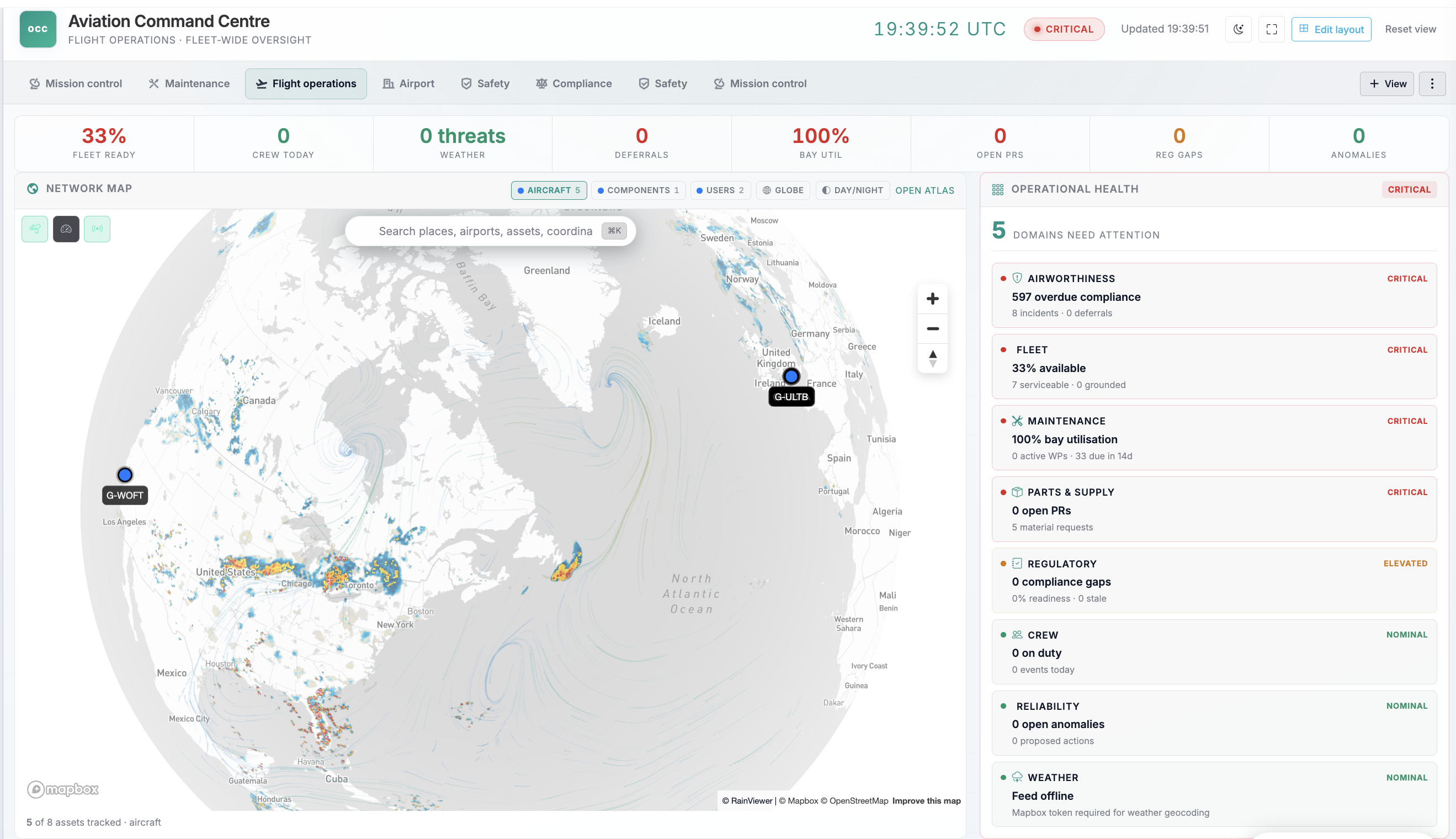
- Status Ribbon KPIs — Eight top-line indicators across fleet, crew, weather, deferrals, bays, procurement, regulatory, and reliability
- Operational Health Matrix — Domain-by-domain severity with actionable metrics for each operational area
- Embedded Fleet Map — Live Atlas map with links to full geospatial workspace and individual aircraft records
- Airworthiness & Deferrals — Open incidents, deferred defects, and dispatch blocks visible before the day unfolds
- Maintenance Capacity — Bay utilisation and work package load for hangar and line maintenance control
- Parts & Supply Signals — Open material requests, purchase activity, and rogue-part reliability indicators
- Regulatory Alerts — Compliance programme gaps and regulatory intelligence signals on one screen
- Customisable Layout — Add, resize, and persist widgets — schedule mini, maintenance forecast, calendar, and more
Atlas & Maps
Aviation operations need more than a pin on a map. AirOS Atlas is the geospatial operations layer for your fleet: live asset positions, planned and flown routes, airspace and NOTAM context, traffic overlays, and landing-site survey workflows — all connected to the same aircraft, schedule, and flight-data records. Flight Log remains the e-techlog and sector record; Atlas is the map and survey workspace those records can open into.
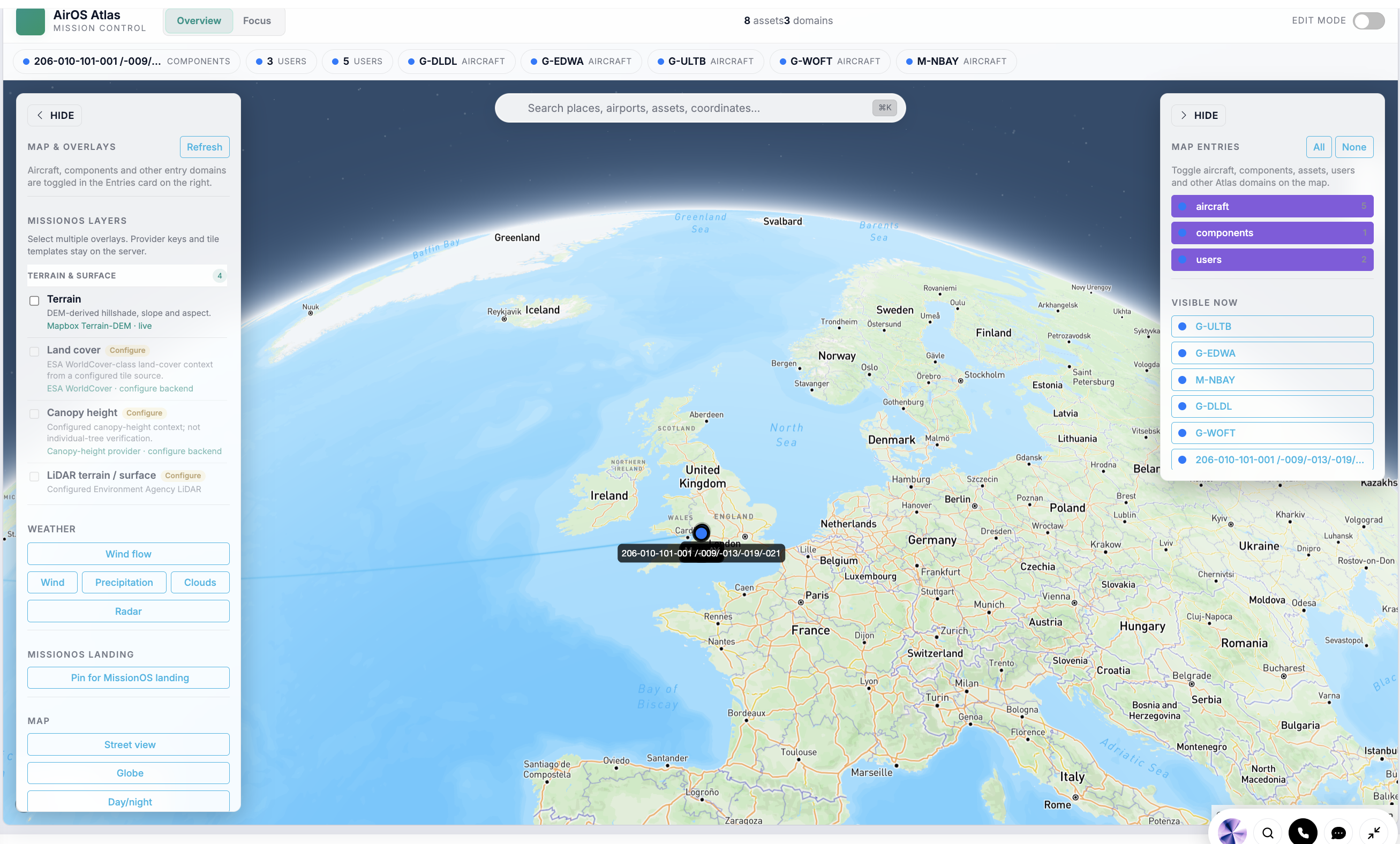
- Live Fleet Map — Real-time aircraft positions with status context from fleet and maintenance records
- Flight Planning & Waypoints — Route planning with waypoint management, airport data, and weather context
- Schedule Route Overlay — Visualise planned schedule legs and operational routes on the same map
- Airspace & NOTAM Display — Operational airspace context and NOTAM awareness for dispatch and crew briefing
- Traffic Map — Surrounding traffic picture for situational awareness during planning and monitoring
- Landing Site Survey — Structured landing-site assessment with imagery, scoring by aircraft type, and flight-planner integration
- Flight Data Focus & Timeline — Scrub historical flight data on the map for post-flight review and engineering analysis
- Command Centre Embed — Fleet map widgets embed in the Aviation Command Centre for OCC-style oversight
Flight Log
Plan, track, and log flights with an interactive map, real-time weather, waypoint management, and multi-leg routing — then land hours and cycles against the aircraft in a unified e-techlog. Atlas is the wider geospatial operations layer; Flight Log is the sector and tech-log record.
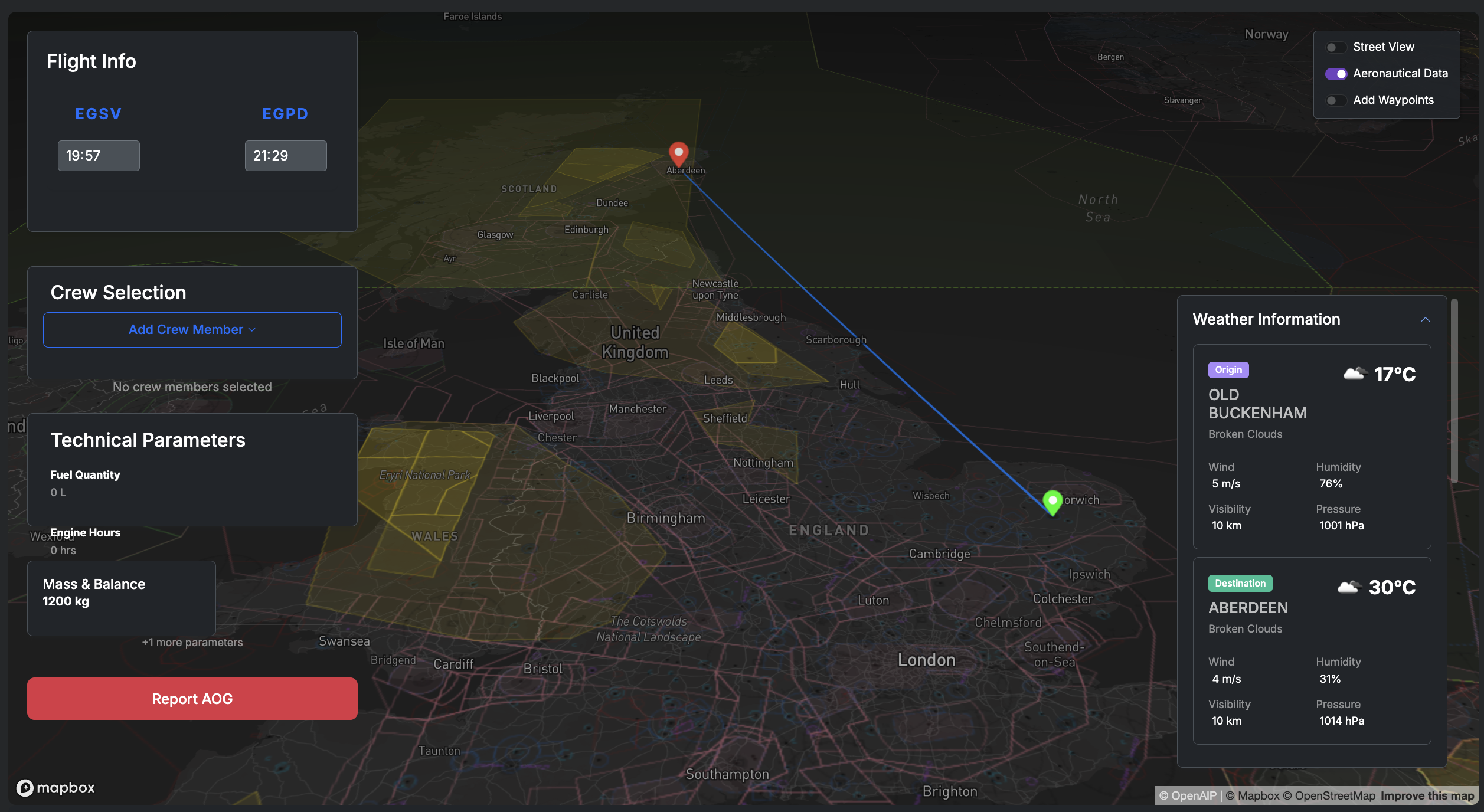
- Interactive 3D Map — Visualise flight routes with 3D terrain, satellite imagery, and aeronautical overlays
- Real-time Weather — Live weather data for origin and destination with detailed meteorological information
- Waypoint Management — Click-to-add waypoints with intelligent airport detection and custom location support
- Multi-leg Flight Planning — Plan and visualize complex multi-leg flights with individual route optimization
- Crew & Mass Integration — Integrated crew selection and mass & balance calculations within the flight log
- CRM flying-time invoices — Link a customer on the flight log and import accrued sectors into commercial invoices
- Load sheet & manifest — Combined load sheet, seating manifest, and interactive aircraft diagram in a single flight-log workstation
- Technical Parameters — Track and log technical flight parameters and performance data
AirOS App (EFB)
The AirOS app is the Electronic Flight Bag for the same operational record as the web platform — not a separate logbook. It is available on iOS and Android for entitled users of your organisation (not a separately listed priced module). Crews work offline with PIN authentication, QR provisioning, and auto-sync when connectivity returns. Scheduled sectors land under a daily tech log book per aircraft; regulatory print and the pilot QR flow share that structure.
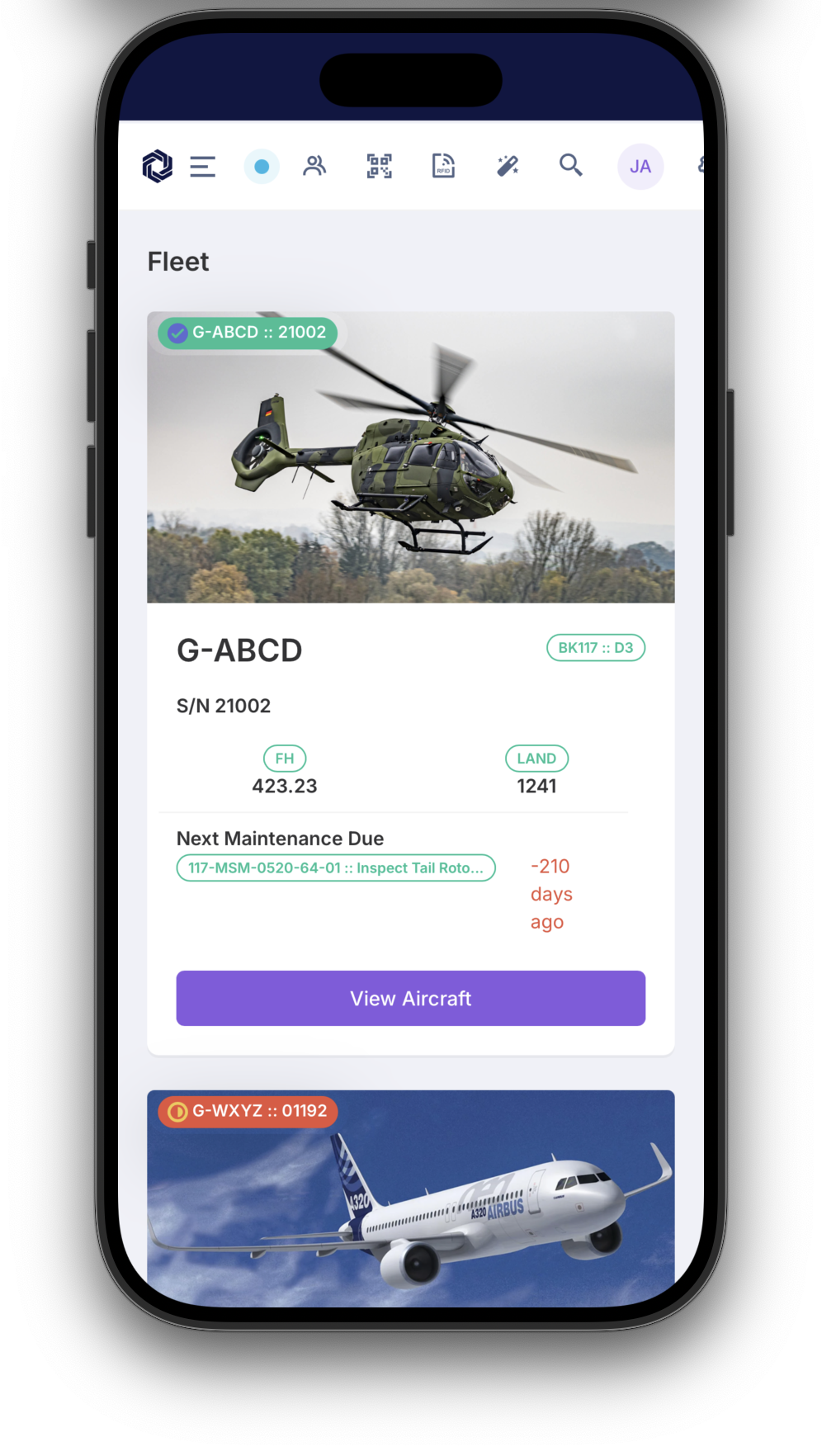
- Offline-first EFB — Full tech log and schedule workflows without internet — PIN auth, QR setup, and auto-sync when connected
- Unified e-techlog — Scheduled sectors create sector legs under a daily tech log book per aircraft, shared with web and print
- Apple Wallet passes — Boarding, crew duty, passenger tickets, and employee ID on iPhone and Apple Watch after ops confirm the trip
- Native document scanner — Camera page-detect and crop adds PDFs to ARC-as-a-service and other document import flows
- SMS incident fallback — When the device has no data, a cellular SMS can still enter the same OCC and Safety workflow — it requires a working SMS service
- Line-worker alarm — Optional armed session with cancelable pre-alarm on stillness, likely fall, or SOS; a Safety incident is created only after escalation, not because the app “knows” someone is down
- Load sheet on device — Mass and balance workstation, seating manifest, and interactive diagram in mobile-friendly tabs
- Owner booking on iPhone — Owners request trips, see map confirmation, and add boarding passes from the same app as crew
Schedule
Plan flight operations, maintenance events, crew assignments, and hangar capacity in one resource timeline with clash detection and a schedule-driven maintenance forecast. Schedule is the operational calendar. The Scheduling Engine adds constraint-based proposals. Long-term Capacity is multi-year hangar pressure and waves. Roster is personnel shifts.
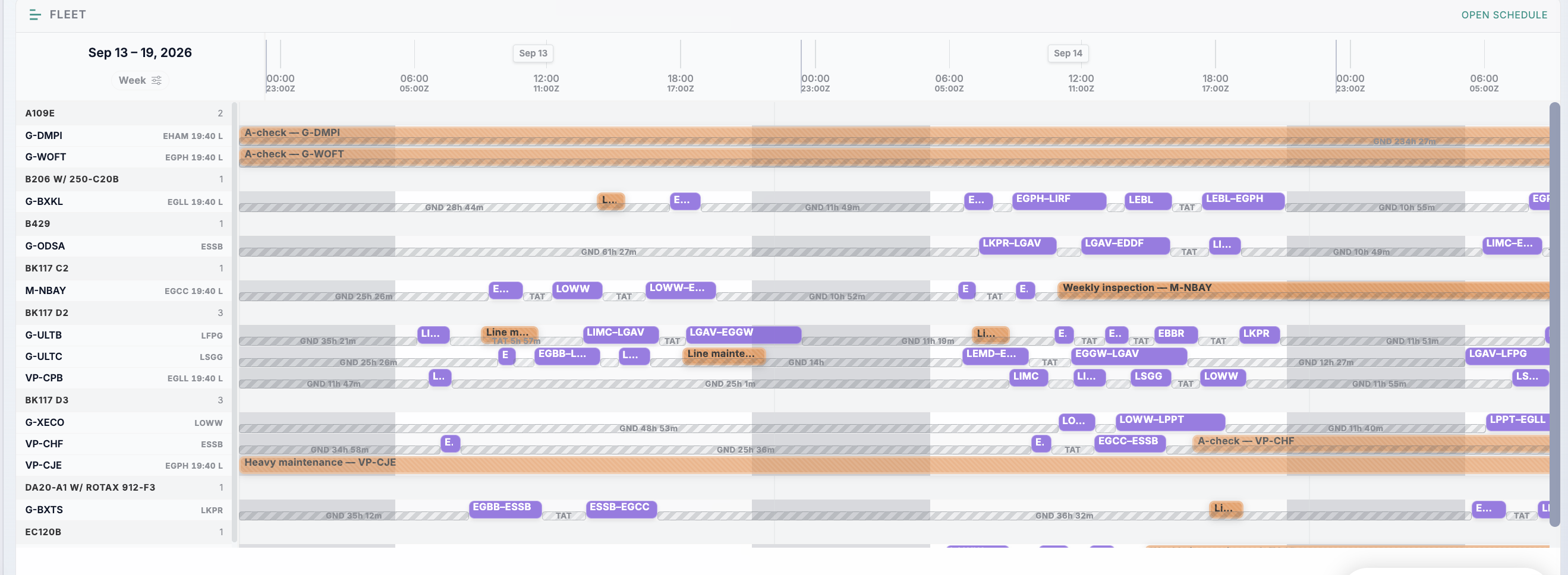
- Flight Scheduling — Plan and manage flight schedules with aircraft availability tracking
- Maintenance Planning — Schedule maintenance events and track compliance requirements
- Crew Management — Assign crew members based on certifications and availability
- Resource Allocation — Optimize hangar slots, equipment, and facility usage
- Conflict Resolution — Automatically detect and resolve scheduling conflicts
- Capacity Planning — Forecast demand and optimize resource utilization
- Real-time Updates — Live schedule updates with automated notifications
- Compliance Tracking — Ensure regulatory compliance for all scheduled activities
Flight Time Limitations
Crew scheduling must respect flight time limitations — not as an afterthought. AirOS FTL validates duty periods, rest requirements, and cumulative limits against your roster and schedule, flagging conflicts before they become operational or regulatory issues.
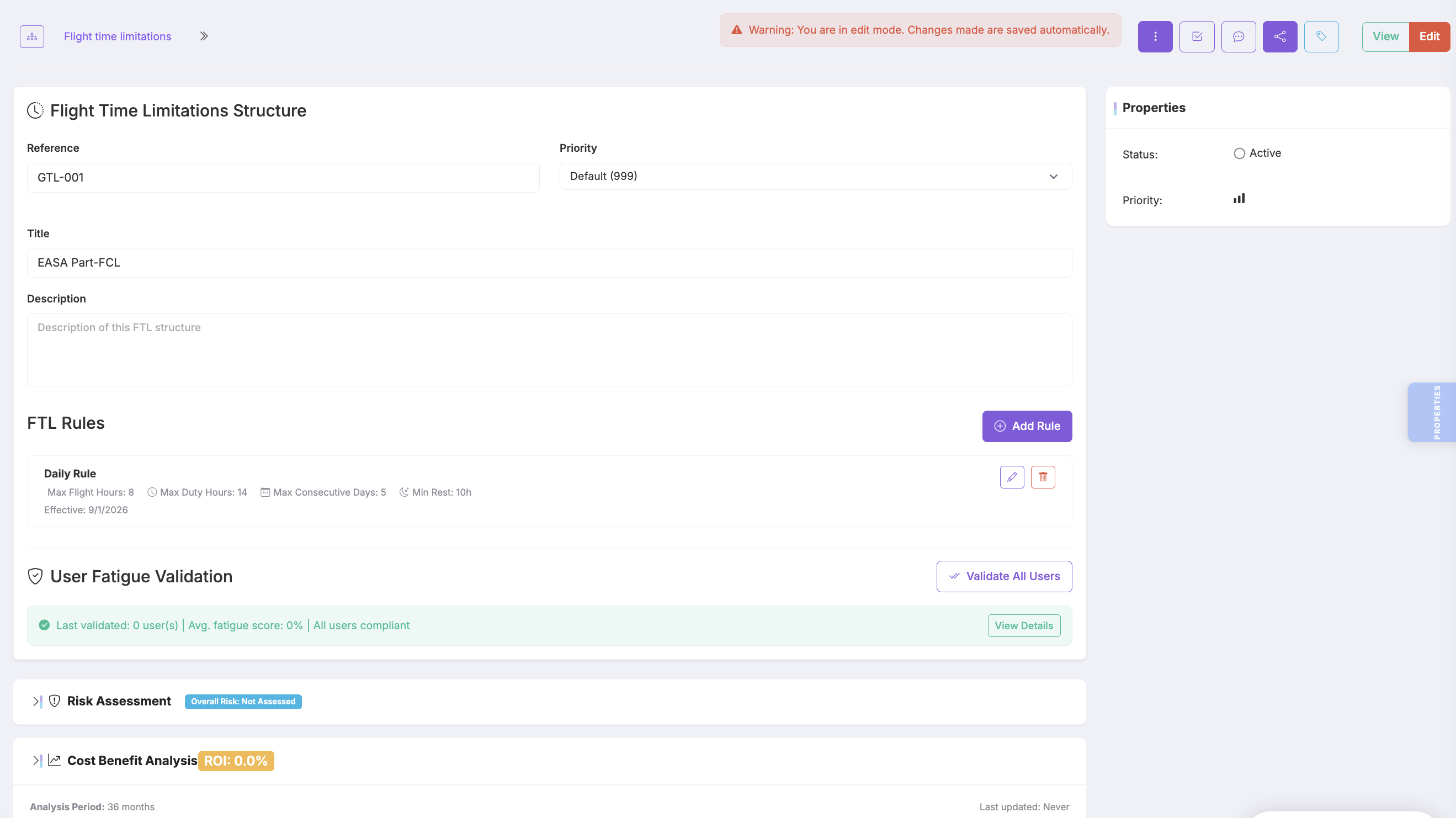
- Duty Time Validation — Validate crew duty periods against configured FTL rules
- Roster Integration — FTL checks run alongside shift and roster assignments
- Schedule Integration — Flag FTL conflicts when building or optimising schedules
- Configurable Rules — Organisation-specific FTL structures and limits
- Compliance Visibility — Clear indicators for planners and crew managers before publish
Mass & Balance
Record scale readings against a weighing profile, confirm deficient and surplus items, and generate a weighing report from that data. AirOS does not replace your approved weight-and-balance manual or regulatory basis; it supports recording, calculation, and traceability of the weigh in the system.
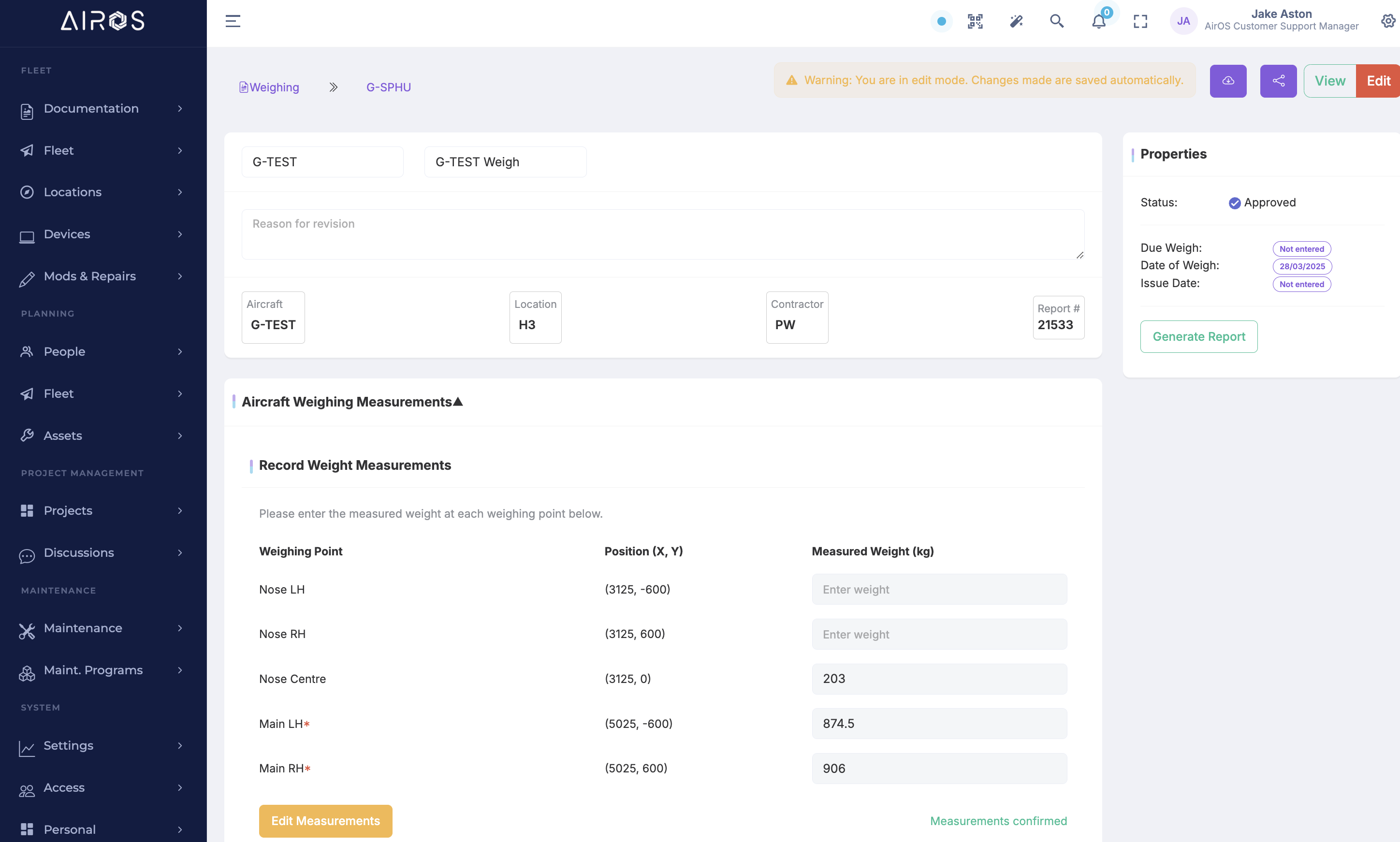
- Weighing Profiles — Create configurable weighing templates for different types
- Longitudinal and lateral CG — Calculate mass and longitudinal and lateral centre-of-gravity positions from entered weighing-point data
- Flight Manifest — Load crew, cargo and variable loads and generate load-sheet manifests; certify in-platform where your organisation requires sign-off
- Track Changes — Track mass changes between weighs, SBs, modifications and repairs
- Real-Time Calculator — Calculate aircraft mass and balance on-the-fly with live weight distribution updates
- Safety Validation — Automatic alerts if loading exceeds safe limits
Flight Data Monitoring
Ingest real-time and historical flight data from simulators, drones, and aircraft via plugins (ArduPilot, DJI, X-Plane, MSFS) and manual upload.
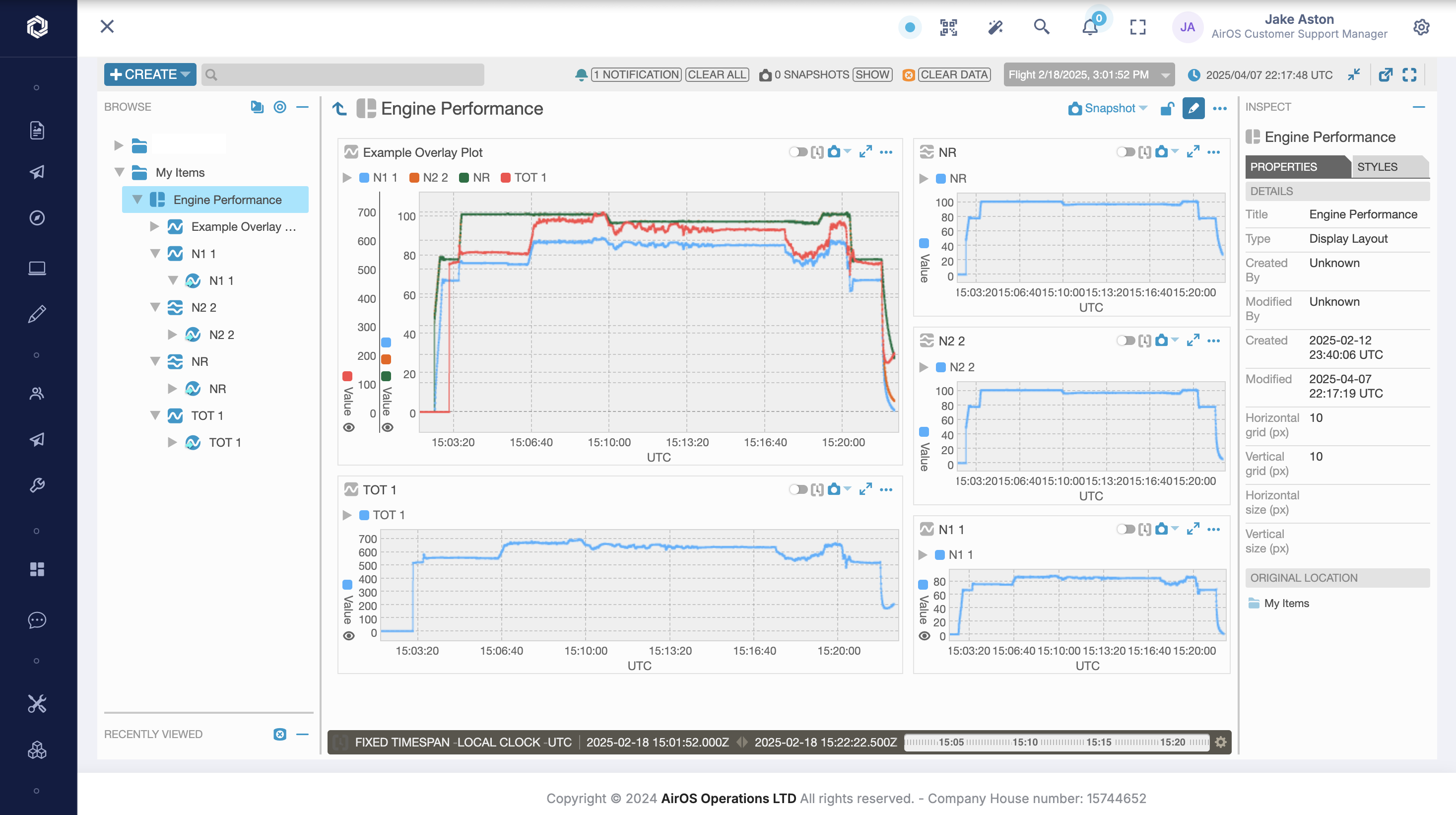
- Aircraft, Drones & Simulators & Plugins — Pull data from aircraft recorders, ArduPilot, DJI, X-Plane, MSFS, and other flight data connectors
- Flight Data Viewer — Live and historical flight data visualisation with flight time ranges
- Multi-Source Upload — Upload real-time and historical flight data from multiple sources
- Computational Parameters — Add calculated parameters that run beside raw recorded parameters
- Trend & Alert Engine — Set trends, triggers and alerts for early fault detection
- Analysis Pipelines — Baselines, features, forecasts, anomalies, and correlation jobs
- Helisafe Connector — Import flight data from Helisafe upload workflows
Incident Management
Report, track and resolve aircraft-on-ground (AOG) events and operational incidents from any location. This is the occurrence desk; Safety Management System (SMS) holds hazards, risk assessments, mitigations, and safety metrics.
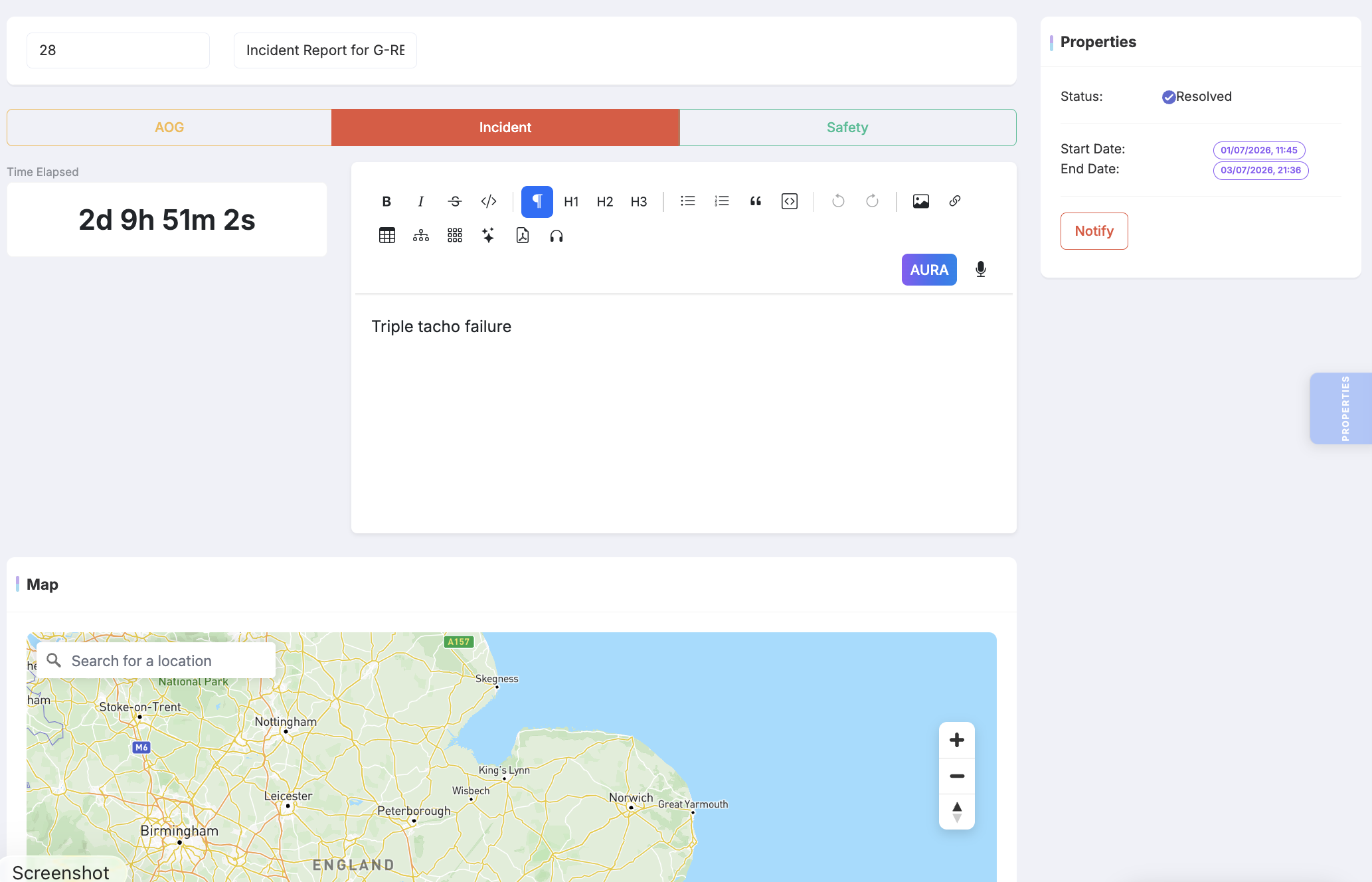
- Incident & AOG Reporting — Create incident records from any device and attach photos, videos and GPS/What3Words location data.
- Real-time Stakeholder Alerts — Notify configured people via in-app, email, SMS, and optional voice according to your rules. Delivery is not instantaneous in all conditions and SMS needs a cellular service
- SMS incident fallback — No-data cellular reports from the native app, routed into the same incident record as web and iOS submissions
- Line-worker alarm — Native cancelable pre-alarm on stillness, likely fall, or SOS; a Safety incident is created only if the worker does not confirm they are OK (or SOS is configured to escalate)
- AI Meeting Minutes — Use AURA to transcribe and structure incident meetings so no detail is missed.
- Timeline & Task Tracking — Track corrective actions, assign owners and monitor closure to maintain accountability.
- Audit-ready Reports — Generate full incident dossiers and export evidence packs for regulators and insurers.
- Safety Management System — Link operational incidents into the SMS module for hazards, risk, and safety metrics — SMS is a separate record from the AOG desk
Safety Management System (SMS)
Implement a Safety Management System (SMS) in line with ICAO and EASA requirements — hazards, safety reports, risk assessment, mitigations, metrics, and SMS documentation. Incident Management is the operational AOG and occurrence desk; SMS is the safety-management record those events can feed.
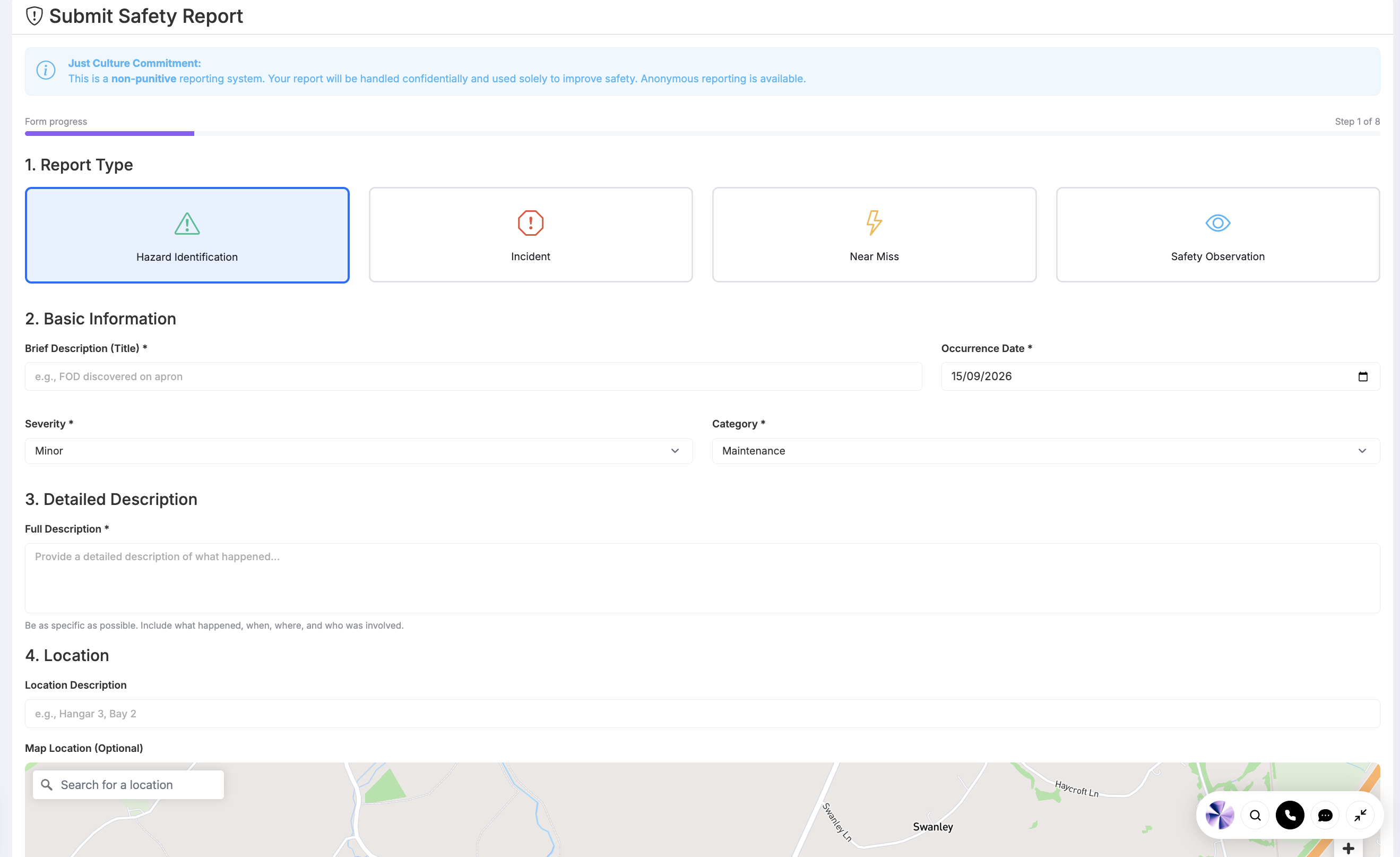
- Hazard Reporting — Report and track hazards with risk classification and mitigation
- Safety Reports — Safety reports and occurrences with full audit trail
- Risk Assessment — Risk assessment and mitigation tracking for safety issues
- Safety Metrics — Automatic safety metric calculations and trend reporting
- Regulatory Compliance — SMS documentation and compliance with ICAO/EASA requirements
- Incident Integration — Link to incident management for AOG and operational incidents
- EFB line-worker alarm — Optional native session: motion/stillness or SOS starts a cancelable pre-alarm; if not cancelled, a Safety incident is created and configured contacts are notified (in-app, email, SMS and voice as set up). Requires the device to be armed and, for SMS, a cellular service
- SMS occurrence capture — When the native app has no data, crews can still send a cellular SMS into the safety and incident workflow — that path needs a working SMS service, not only the AirOS app
Management of Change
Aviation organisations cannot afford unmanaged change. AirOS Management of Change (MoC) provides structured change records with risk scoring, approval workflows, and automated impact detection across linked procedures, training, and operational data.
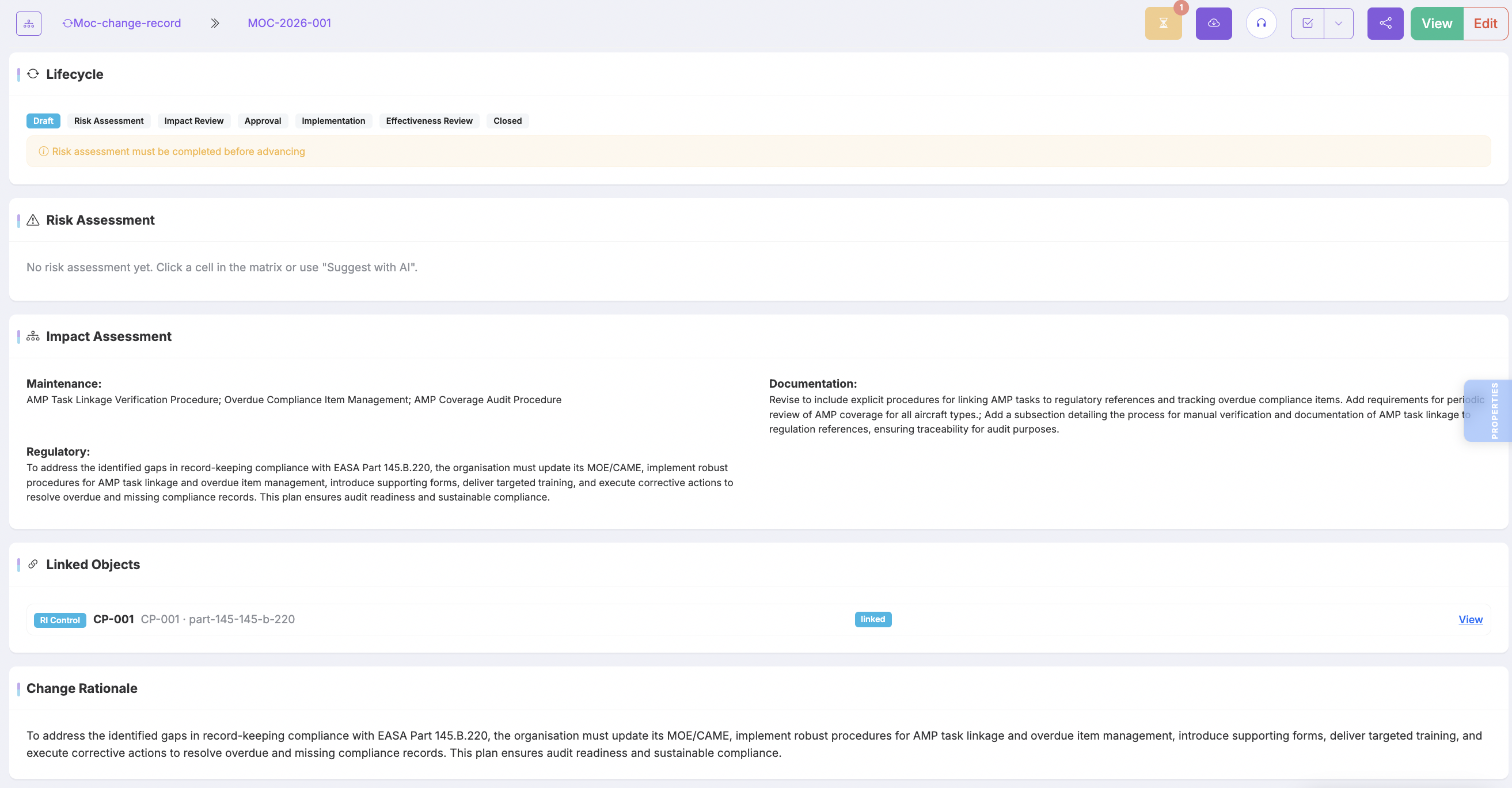
- Change Records — Structured MoC records with categorisation and lifecycle tracking
- Risk Assessment — Built-in risk scoring and mitigation planning for each change
- Approval Workflows — Configurable approval chains with electronic sign-off
- Impact Detection — Automatically surface affected procedures, training, and records
- Audit Packs — Exportable evidence bundles for quality and regulatory review
- MoC Dashboard — Overview of open changes, risks, and approval status
Competency Programmes
Personnel competence is as critical as airframe compliance. AirOS Competency Programmes track training requirements, campaigns, and user competency forecasts alongside your maintenance and safety systems — who is due, overdue, or in a campaign. When you deliver approved courses, exams, seats, and authority reports, the Training (Part-147) module is the delivery platform.
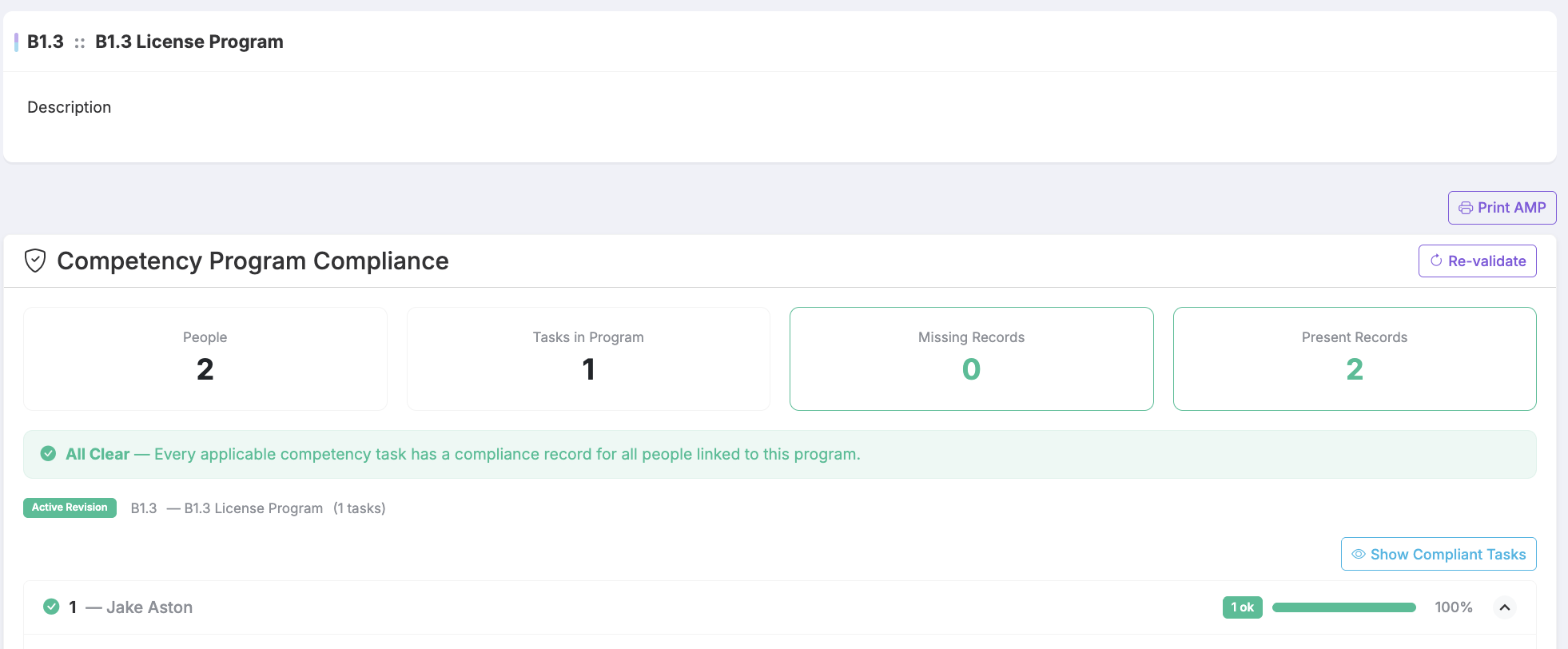
- Competency Programmes — Define training programmes with requirements and validity periods
- Campaigns — Run competency campaigns with tracked completion status
- User Forecasts — Forecast upcoming and overdue competency requirements per person
- Competency Flights — Schedule-linked training flights integrated with fleet scheduling
- Certification Link — Connect competency records with user certification tracking
Training (Part-147)
Personnel competence needs the same rigour as airframe compliance. AirOS Training is a Part-147 platform for approved training organisations and operators who sell or deliver courses: course templates with sectioned materials and question banks, published course runs, exam templates and generated papers, invigilation and marking, attendance, and a certificate register. Competency Programmes remain the operational forecast of who is due; Training is how approved courses are delivered.
- Course hubs — Templates, sectioned learning materials, question banks, and generated exam papers in one course record
- Exams & marking — Exam sittings, invigilation, marking, and sitting reports with organisation form numbers
- Seats & commerce — Stripe checkout or manual seats, assignment, expiry reminders, and sponsor views on the customer portal
- CRM forms — Send structured forms from any customer; recipients complete by portal token or signed-in portal
- Authority reports — Attendance, certificate register, and exam reports with Part-147 approval and configurable form numbers
- Meeting assistant — Optional training-session bots for attendance and transcripts, branded to your organisation
Aviation Data Exchange (ADX)
Continuing airworthiness depends on data moving between operators, CAMOs, and Part-145 organisations — without losing traceability or control. AirOS ADX (Aviation Data Exchange) is the trust network for cross-organisation collaboration: handshake partnerships, permission templates, read-only copies of partner records, local working copies, and structured compare-and-merge when both sides need to reconcile technical data.
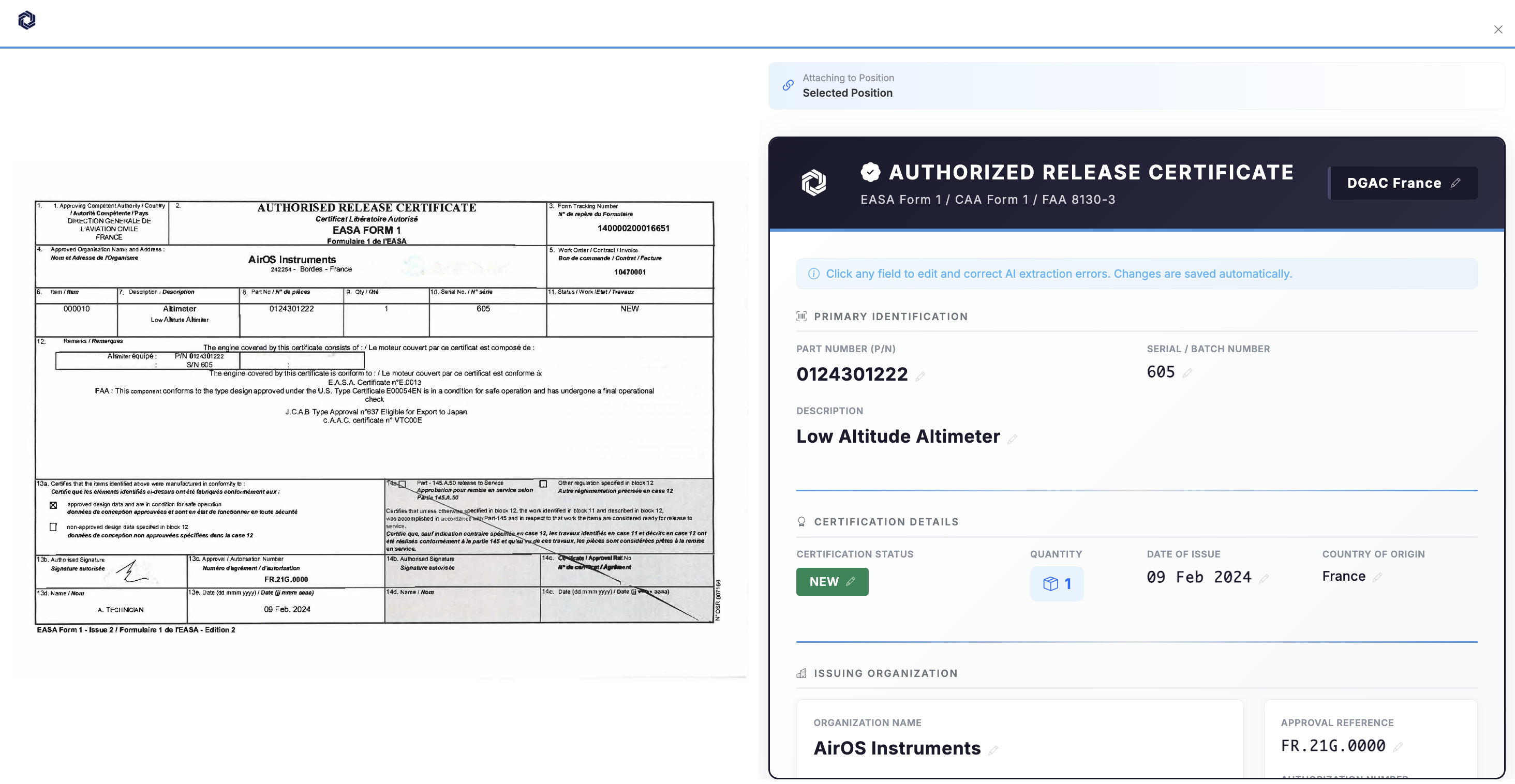
- Partner Handshake & Branding — Establish trusted ADX partnerships with scoped permissions and branded partner portals
- CAMO Review Queue — Structured queue for CAMO review of MRO-submitted records and release documentation
- Change Requests — Cross-organisation change-request workflow between CAMO and MRO with full traceability
- Read-Only Partner Copies — Receive authoritative read-only copies from partner organisations without data drift
- Compare & Merge — Reconcile local working copies against partner source records with controlled merge
- Form 1 Verification — Fabric trust-network verification for release certificates and authorised release documentation
- Permission Templates — Reusable partner permission templates for repeatable CAMO–MRO onboarding
- CRM & Commercial Link — Connect exchange relationships to CRM accounts and commercial onboarding workflows
Customer Portal
Your customers and aircraft owners need visibility — not a login to your entire CAMO system. The AirOS Customer Portal is a branded web experience (separate from the crew EFB app): account-based access, per-aircraft status views, linked entry visibility, quotes, invoices, training seats, and owner booking — scoped by what you choose to expose.
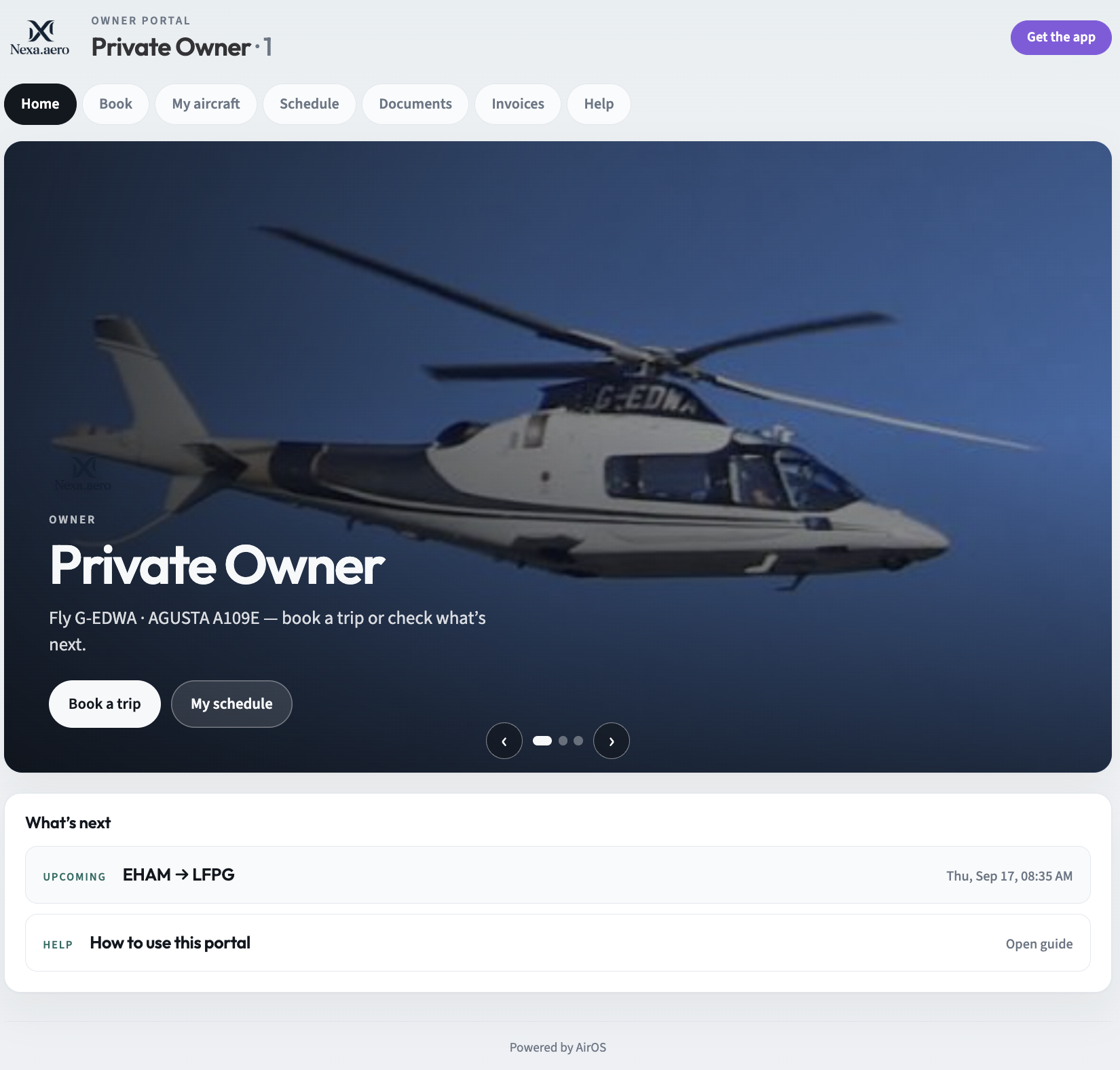
- Branded Login Experience — Customer-facing login with organisation branding and scoped account access
- Aircraft Status Views — Per-aircraft operational and airworthiness summary for entitled account holders
- Owner booking & map confirm — Owners request trips; ops confirm onto the schedule; booking confirmation shows the route on a map
- Apple Wallet boarding — Confirmed owner trips and passenger tickets add boarding passes to iPhone and Apple Watch
- Linked Entry Access — Expose selected technical records, documents, and work packages to customers
- Commercial Document Delivery — Customer quotes, invoices, and commercial documents through the same portal
- Training seats & forms — Sponsors view course seats; customers complete CRM forms without a full AirOS login
- CRM Account Integration — Portal provisioning tied to CRM accounts, contracts, and onboarding workflows
Production Programmes (POA)
Part 21 and POA organisations need the same rigour on the production line that CAMOs expect in continuing airworthiness — but with routing, concessions, and build standards at the centre. AirOS Production Programmes manage certified production routing: build standards linked to drawings and parts, production work packages, Start Build workflows, travellers, and concession handling — integrated with maintenance programmes, components, and document control.
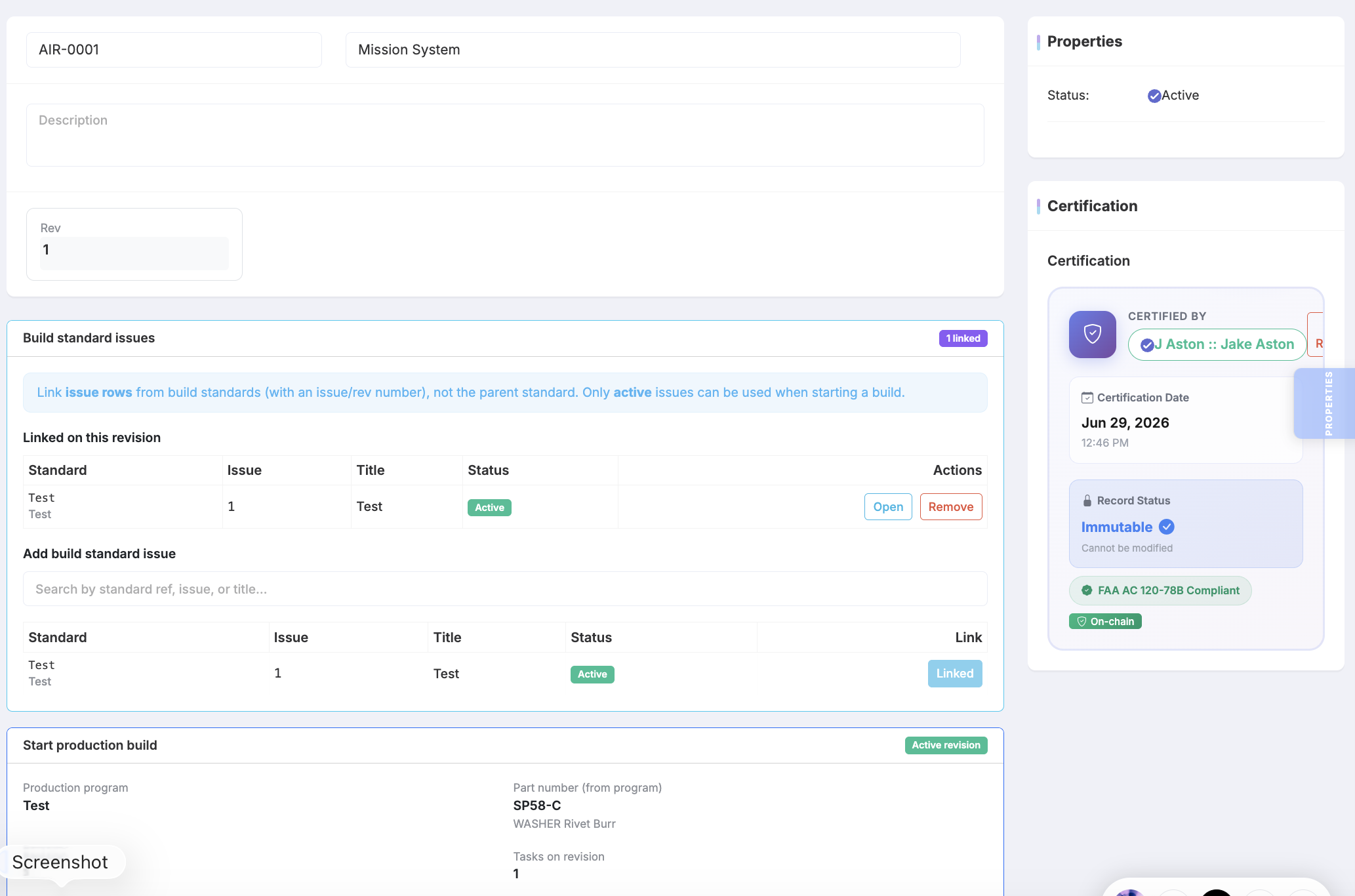
- Certified Production Routing — Define and maintain approved production routes linked to maintenance and quality programmes
- Build Standards & Drawings — Hierarchical build standards with drawing structure and parts linkage
- Production Work Packages — Structured production WPs with task, parts, and document references
- Start Build & Travellers — Shop-floor travellers and Start Build workflows with full build traceability
- Concessions Register — Production concessions with evidence links, rework tasks, and quality closure
- Component & Parts Traceability — Serialised traceability from parts catalogue through build to released article
- Quality & Certification Controls — Work package quality gates and certification controls aligned to POA requirements
- Maintenance Programme Link — Connect production programmes to continuing airworthiness maintenance data
AirOS Distributed UTM
AirOS Distributed UTM is a development programme for uncrewed traffic management. An Unmanned Traffic Control Zone (UTCZ) is a local airspace cell that can run where drone activity is present: fuse position data, show tracks, and raise conflict advisories to pilots or onboard systems.

- Dual-role AirOS Nodes — Planned compact LTE-M + GNSS devices that can act as airborne beacons or ground receivers for Remote ID over Bluetooth and Wi-Fi — hardware availability is scoped per programme
- Dynamic UTCZ Management — On-demand zone servers that spin up automatically to handle live operations, scaling from a single drone to dense urban airspace
- Networked Conflict Detection — Adjacent UTCZs share data and hand off aircraft seamlessly across boundaries, maintaining safety and continuity
- Real-time Airspace Visualization — Interactive 3D airspace maps showing active UTCZs, aircraft positions, and conflict zones with live updates
- Remote ID Integration — Designed for Remote ID detection over Bluetooth and Wi-Fi when Nodes are deployed; support level follows the hardware release, not the software map alone
- NATS OpenAir Integration — Intended connection to UK airspace modernisation / NATS OpenAir-style information services when the integration is commissioned for your deployment
- Automated Conflict Resolution — Conflict detection with advisories to pilots or onboard systems is the design intent; automated resolution is not a released, unsupervised capability
- Regulatory Compliance — Designed with CAP 722 and emerging U-space concepts in mind. Specific regulatory approvals remain the operator’s responsibility
Modifications
Define, maintain, and track modification build standards, embodiment records, and compliance across your fleet.
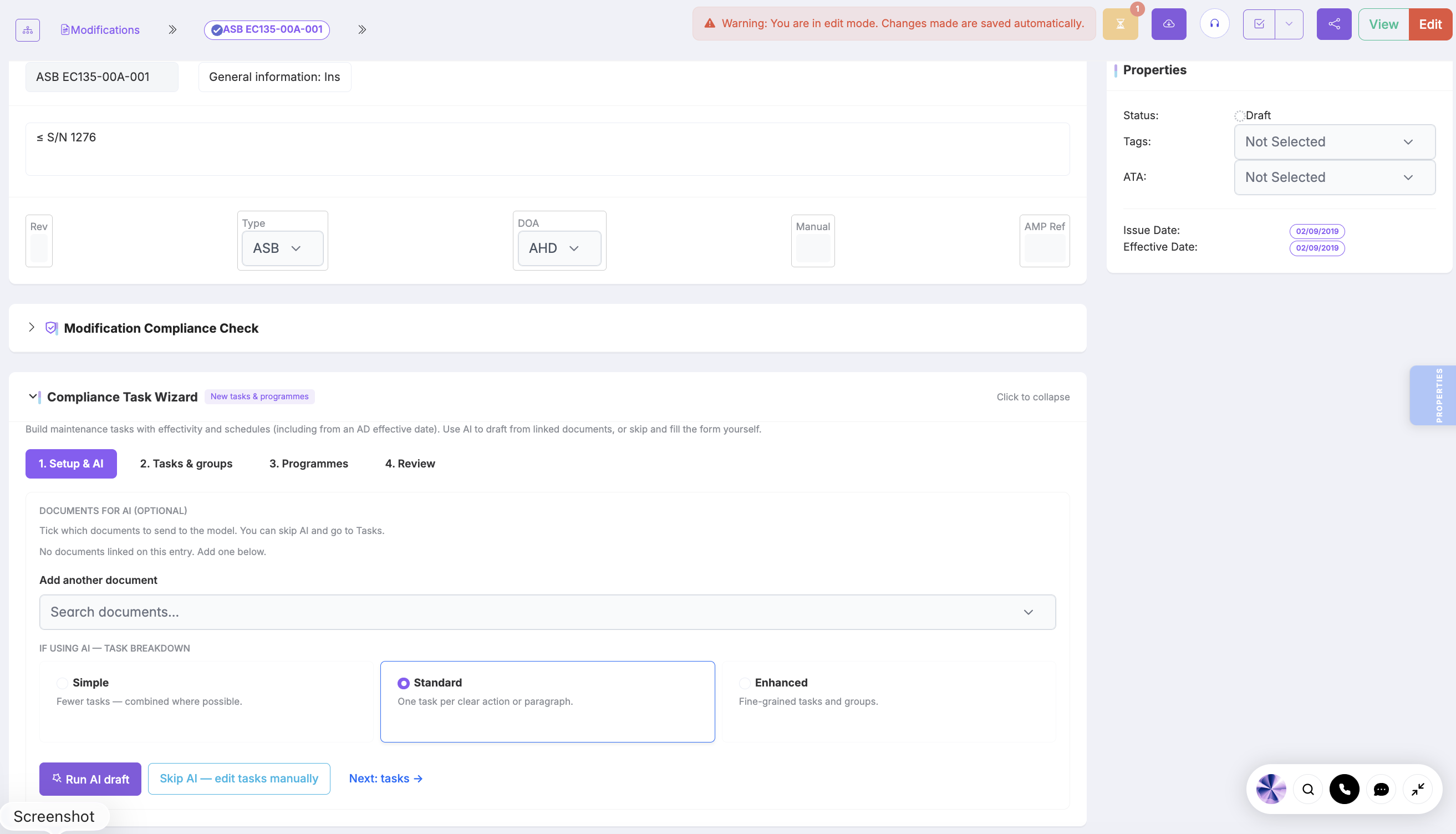
- Modifications — Define different types of modifications for various aircraft
- Build Standards — Automated tracking of modification build standards
- Embodiment Records — Automated tracking of modification embodiment records
- Airworthiness Directive Link — Attach one or more ADs to the modification; only certified embodiment stamps those linked ADs complied on the aircraft
- Compliance Tracking — Automated tracking of modification compliance
- Workflows — Automated workflows for modification compliance
- Reporting — Generate compliance reports and audit trails for modification management
Inventory & Stores
Track and manage inventory levels across multiple store locations including main stores, satellite locations, and mobile inventory units. This is parts stock — Procurement raises the order; Assets is tooling and calibrated equipment.
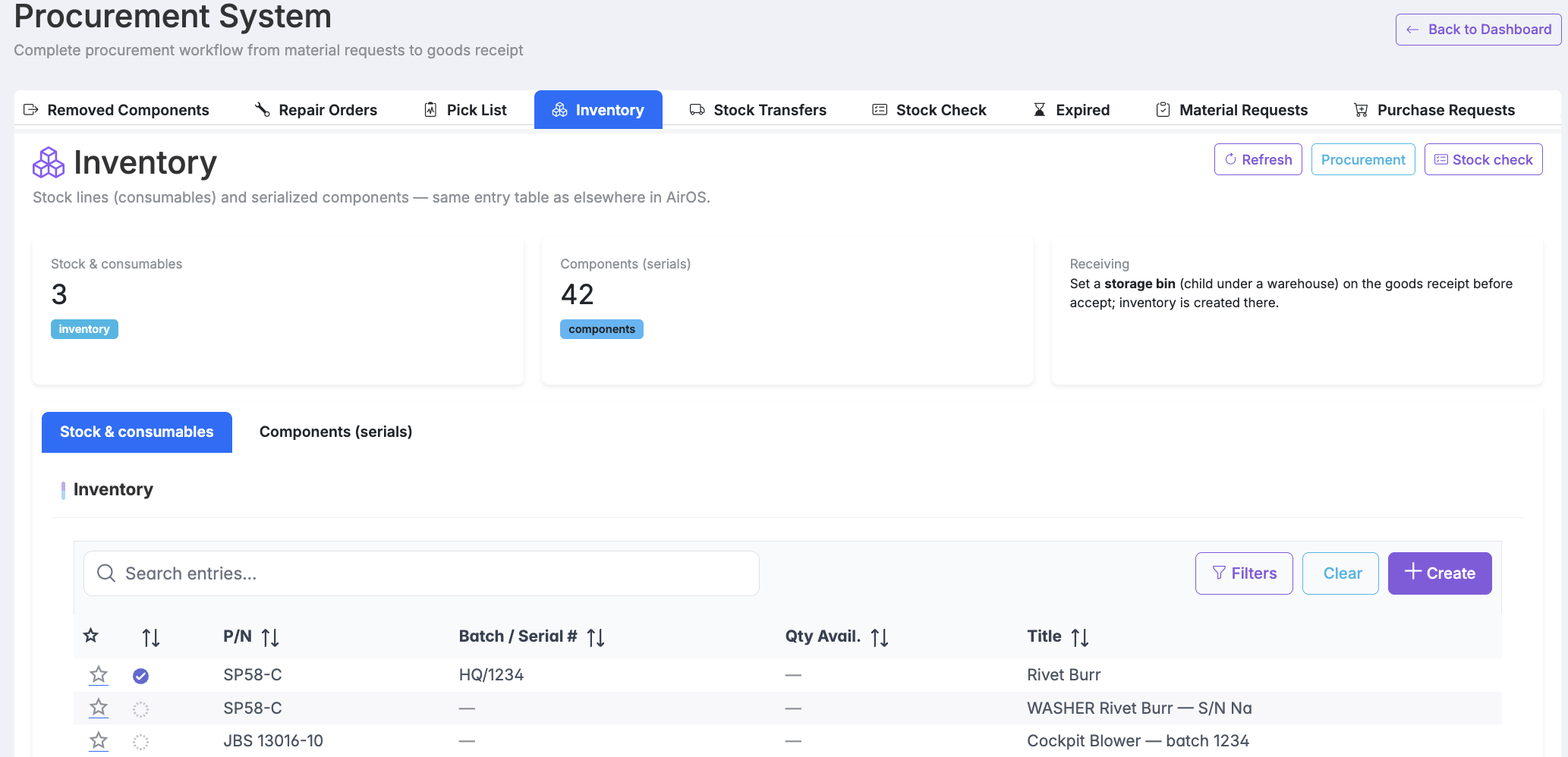
- Multi-Location Inventory — Track inventory across multiple store locations and mobile units
- Automated Reordering — Intelligent reordering based on usage patterns and minimum stock levels
- Parts Traceability — Full traceability of aviation parts for regulatory compliance
- Stock Alerts — Automated alerts for low stock, overstock, and reorder requirements
- Stock Transfers & DG — Inter-warehouse transfers with dangerous goods section support
- Pick Lists — Warehouse picking linked to work packages and material issues
- Shelf Life & Expired Stock — Automated shelf-life tracking and expired stock views
- Demand Forecasting — Predict inventory needs based on historical usage and maintenance schedules
AirOS IoT
Extend AirOS beyond the screen with an optional IoT layer for physical asset visibility. Hardware (readers and tags) is an upcoming release — organisations can start with software-only asset records in Assets and add devices when ready.
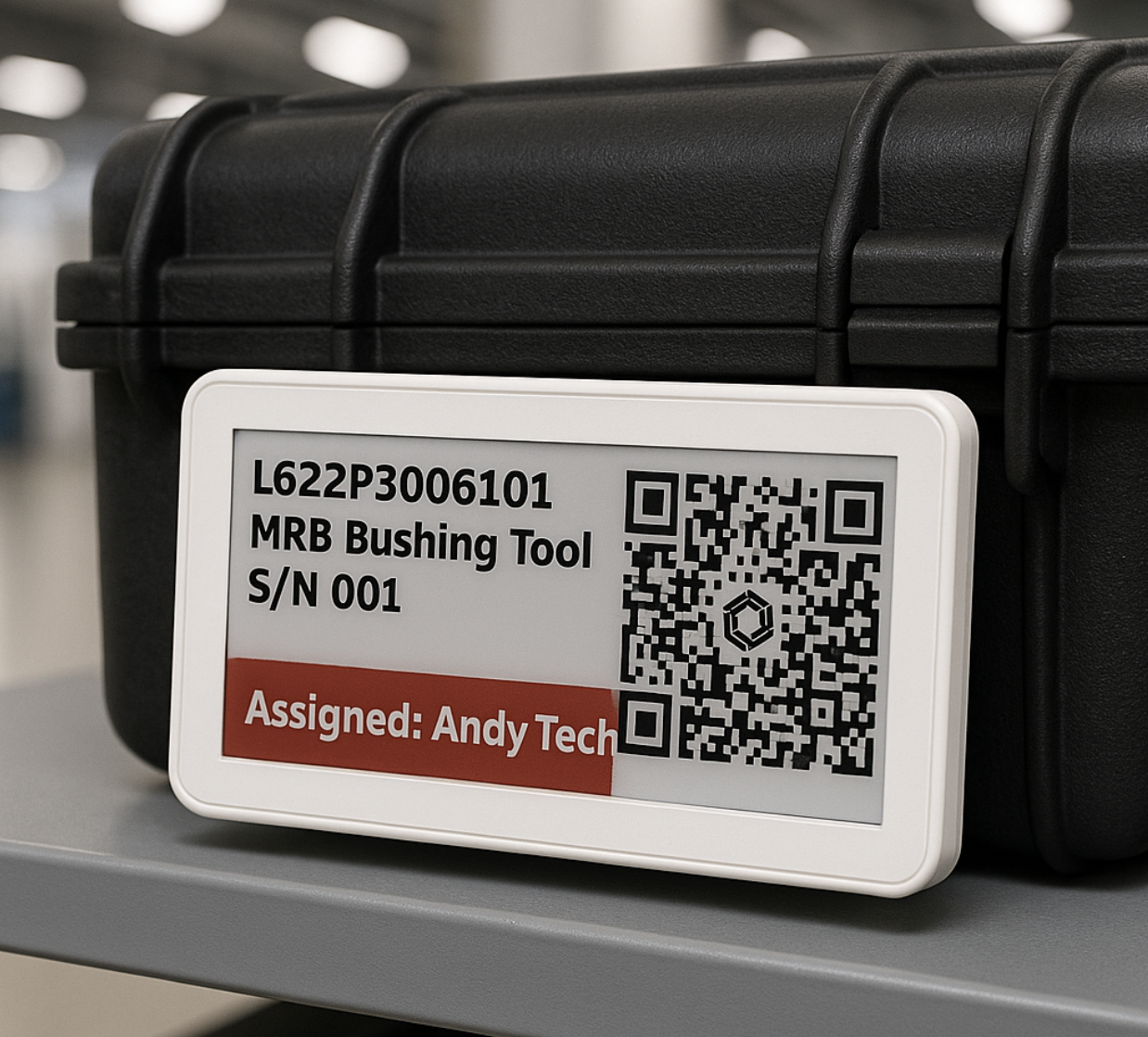
- UHF RFID Asset Tracking — Track tooling, equipment, and logistics units with UHF RFID readers and tags — automatic reads at doorways, stores, and transit points
- E-ink Status Tags — BLE e-ink displays bound to AirOS entries show calibration status, location, and due dates on the asset itself
- Tooling & Calibrated Equipment — Know which tools are available, calibrated, and where — before work packages start
- Onboard Equipment Tracking — Track rotables, survival equipment, and shipset items across aircraft and locations
- Logistics & Shipment Visibility — RFID-enabled logistics tracking from dispatch to receipt with audit trail in AirOS
- Tool Store eDisplays — Wall-mounted e-ink displays in tool stores show live asset status without opening a browser
- Custody & Location Events — Automatic custody changes when assets pass RFID read points — linked to entries and maintenance records
- Maintenance Integration — Calibration due, inspection status, and work package requirements surfaced on tags and in AirOS
Procurement
Manage aviation procurement end-to-end: material requests with approvals, purchase requests and orders, supplier quotations, and goods receipt with manual GRN entry. This is the buying workflow — Inventory & Stores holds stock, locations, and issues.
- Requisitions — Create and track purchase requisitions with approval workflows
- Purchase Orders — Raise and manage purchase orders linked to requisitions and suppliers
- Supplier Management — Manage supplier relationships, quotes and delivery tracking
- Parts & Services Catalog — Catalog of aviation parts and services with compliance and traceability
- Approval Workflows — Configurable approval chains for requisitions and POs
- Goods Receipt (GRN) — Record goods received with manual entry and work package linkage
- Three-Way Match — Match purchase orders, receipts, and invoices for accounts payable control
- Supplier Quotes — Request-for-quote workflows with supplier replies (including automated integrations) and quote comparison
CRM & Commercial
Manage customer relationships beyond a contacts list. AirOS CRM connects accounts, contacts, sales pipeline, contracts, quotes, invoices, and P&L — in the same platform as your fleet and maintenance data. It is commercial workspace, not fleet scheduling.
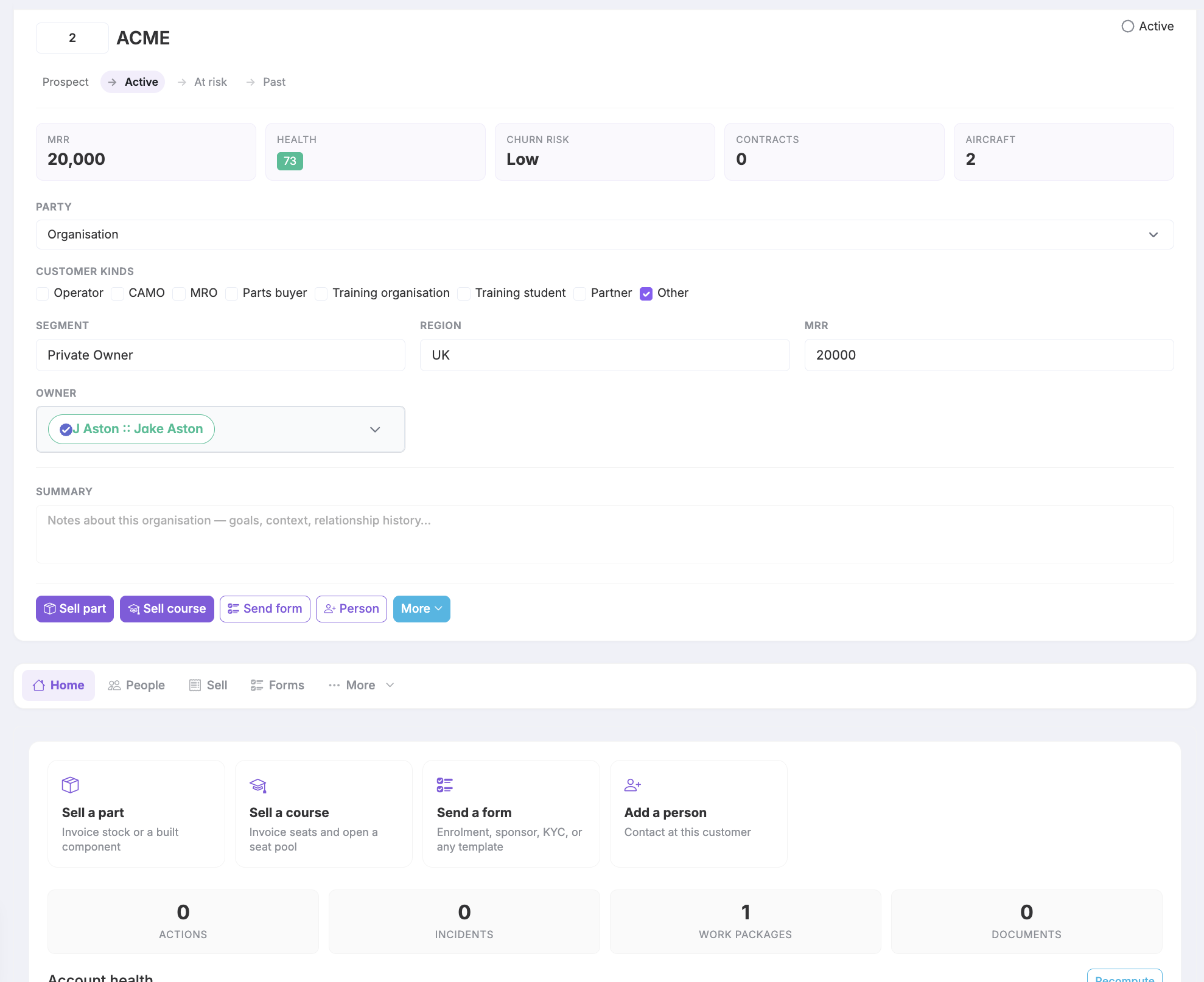
- Accounts & Contacts — Structured CRM accounts with linked contacts and activity history
- Mixed customer kinds — Operators, owners, CAMOs, MROs, parts buyers, and training students, with fleet links that record operator, owner, CAMO, or sold-to roles
- Sales Pipeline — Track opportunities from lead to contract with stage visibility
- Commercial inbox — Inbound sales email with suggested customer replies for staff review, opened from the commercial dashboard
- Contracts — Manage customer contracts linked to fleet and service delivery
- Account health & P&L — At-risk and churn playbooks, health scores, and cost/profit context next to operational data
- Quotes & Invoices — Commercial documents with PDF output and audit trail
- Sell parts & courses — Create a sent invoice in one step from the customer workspace — parts stock or training seats
Communications Hub
Keep operational conversations in context. The AirOS Communications Hub provides channels, direct messages, group chats, and entry-linked threads so discussions stay attached to the work — not lost in email or document import.
- Channels & DMs — Organised channels, direct messages, and group conversations
- Entry-Linked Threads — Chat threads attached to maintenance, safety, and operational entries
- Real-Time Messaging — Live updates with mentions, media attachments, and read state
- AURA Sidebar — Ask questions about operational data without leaving the conversation
- Service Requests — Ticket-style requests with workflows and signed actions
- Discover & Inbox — Unified inbox across channels, DMs, and entry conversations
Assets
Track tools, equipment, and calibrated assets across hangars and tool stores with lifecycle records, utilisation visibility, calibration, custody, and preventive maintenance scheduling. Assets is the software record; Inventory & Stores is parts stock; AirOS IoT is optional hardware that writes location and status into those records.
- NFC Tagging — Write an AirOS entry URL to an NFC tag for tap-to-open lookup. NFC is not a substitute for UHF RFID automatic reads or BLE e-ink displays
- Maintenance Scheduling — Automated maintenance scheduling with compliance tracking
- Asset Allocation — Intelligent asset allocation and availability management
- eDisplay Integration — Real-time asset information on digital displays throughout facilities
- Usage Monitoring — Track asset utilization patterns and performance metrics
- Inventory Management — Comprehensive inventory tracking with automatic stock alerts
- Lost Asset Prevention — Automated alerts for missing or misplaced assets
- Calibration Tracking — Monitor calibration schedules and certification compliance
Roster
Schedule and manage personnel assignments across aviation departments — shifts, availability, leave, on-call, and qualification checks. Roster is people; Schedule is the aircraft and hangar calendar; FTL is duty-limit assessment against those assignments.
- Intelligent Scheduling — Automated scheduling algorithms that optimize coverage and workload distribution
- Certification Verification — Automatic verification of personnel qualifications for specific assignments
- Availability Management — Track and manage personnel availability, leave, and time-off requests
- Workload Balancing — Ensure fair distribution of work assignments across team members
- Shift Pattern Management — Configure and manage complex shift patterns and rotation schedules
- On-Call Management — Manage on-call assignments and emergency response coverage
- Cross-Department Sharing — Share personnel resources across different departments and functions
- Compliance Reporting — Generate reports to demonstrate compliance with work time regulations
How AirOS is deployed
Aircraft is the essential central module — the fleet record other capabilities attach to. Optional modules (maintenance, schedule, stores, safety, and so on) are licensed as needed. They work together when they share that record; they are not a set of unrelated products that each replace Aircraft.
The native AirOS app (EFB) is included for entitled users of your organisation. Document libraries and fleet context follow Aircraft and Document Control. E-techlog, load sheet, owner booking, and related workflows require the matching operational modules (for example Flight Log, Mass & Balance, Schedule, or Customer Portal) as contracted.
Implementation typically covers configuration, data migration with downloadable Excel templates and review-before-apply validation, and role-based training. Timelines depend on fleet size and module scope; many organisations complete initial go-live in about 6–12 weeks with our onboarding specialists. Support is available in-app and at [email protected] (paid plans are priority-routed). We can arrange a reference conversation with an operator or CAMO on a comparable approval basis — customer names are not published here without consent.
A library of connectors integrates with OEMs, suppliers, and third-party systems. If a connector does not exist yet, it can be developed for your use case.
Integration touchpoints
- Document Control
Author, distribute, and receipt essential airworthiness and operations documentation.
- Maintenance
Work packages, defect tracking, and release documentation linked to the fleet.
- Schedule
Coordinate flight, maintenance, and crew availability in one plan.
- Flight Data Monitoring
Upload and analyse flight or component data alongside operational records.
- Regulation Intelligence
Continuous regulatory monitoring and compliance readiness.
- Stores & Procurement
Parts traceability from request through issue, receipt, and audit.
- AirOS IoT
UHF RFID readers and e-ink asset status tags for tooling, onboard equipment, and logistics tracking — hardware integrated with AirOS entries.
- Airworthiness Review (ARC)
Part-M / Part-CAMO ARC reviews, ARC-as-a-service document onboarding, AD/SB qualifying checks, authorised reviewer sign-off with certification PIN, and freeze-at-issue reports.
- Long-term Capacity
Multi-year hangar pressure, maintenance waves, and cost scenarios that apply back to the operational schedule.
- Training (Part-147)
Courses, exams, seats, CRM forms, and authority report form numbers for approved training organisations.
- Atlas & Command Centre
Geospatial fleet picture and OCC-style operations dashboard.
- ADX
Trusted CAMO–MRO data exchange with Form 1 verification.
Operational resilience
Built for airline-scale assurance: technical records supporting dispatch, release to service, and regulatory evidence must remain trustworthy. Standard platform controls (access, encryption, audit, monitoring) apply to every tenant. Recovery time, restore scope, and extra access pathways are agreed in your contract — not implied by this brochure.
Assurance intent
Integrity first
Records supporting dispatch and release to service must not be silently corrupted.
Recovery objectives
Contractually agreed
Service restoration and maximum tolerable data loss defined per deployment — not assumed.
Restore validation
Periodic exercises
Protection copies tested in assurance events with outcomes recorded for audit.
Enterprise diligence
Evidence packs
Security, resilience, and subprocessor documentation for vendor risk review.
Four pillars
Layered hazard mitigation
Extend your SMS beyond the flight deck
Platform risk is managed with the same discipline as operational risk — hazards identified, assessed, and mitigated before they can affect dispatch, release to service, or regulatory evidence.
- •Controls aligned to nominated posts, least-privilege access, and segregation between production and assurance environments.
- •Immutable audit trails on compliance-critical actions — who changed what, and when.
Protected technical records
Airworthiness evidence you can rely on after disruption
Fleet status, work packages, controlled manuals, occurrence reports, and attachments are protected through encryption and geographically separated retention — with restore capability validated in exercises, not assumed.
- •Protection copies taken on an agreed schedule; access-controlled to the same standard as live records.
- •Restoration scoped to your module entitlement — fleet, maintenance, documents, safety, stores as contracted.
Business continuity
Redundancy and resilience built in — like aviation
AirOS uses redundant capacity and multilayered security, within the architecture agreed for your deployment, to reduce the chance that a platform event affects dispatch, engineering, or maintenance. Recovery objectives and hosting choices are contractual — they are not an unbounded guarantee of uninterrupted operations.
- •Redundant capacity and failover patterns within the architecture agreed for your deployment.
- •Multilayered security — access control, data integrity, monitoring, and supplier assurance working together.
Assured access pathways
OCC, engineering, and maintenance stay connected
Operations control, continuing airworthiness, and maintenance teams keep access pathways that match the deployment you contract — managed service, dedicated hosting, on-premise, or hybrid. Site connectivity remains an operator responsibility; network impairment at a base is mitigated only where redundant pathways are in the agreed design.
- •Resilient hosting patterns and redundant operational pathways where contractually required.
- •Managed service, dedicated hosting, on-premise, or hybrid — responsibilities defined explicitly.
Business continuity assurance
Built-in redundancy
Like aviation systems, AirOS is underpinned by redundant capacity and failover patterns within your agreed architecture — designed to absorb faults before they reach day-to-day operations.
- — Resilient hosting and operational pathways where contractually required
- — Health monitoring with defined escalation procedures
- — Architecture scoped to fleet scale and site distribution
Multilayered security
Security protocols are applied in depth — across access, encryption, tenant segregation, change control, and audit — to prevent unauthorised change and protect airworthiness evidence.
- — Role-based access aligned to nominated posts
- — Encryption in transit and at rest for operational records
- — Immutable audit trails on compliance-critical actions
Business continuity protocols
Monitoring, incident response, and recovery procedures are in place to contain platform events. Validated contingency plans are held in reserve. Whether a given event has operational impact depends on the contracted architecture, your site connectivity, and the modules in your entitlement.
- — Proactive detection and containment before customer impact
- — Protection copies and geographically separated retention
- — Joint exercises available where contractually agreed
Full statement: air-os.app/operational-resilience · Airline annex: air-os.app/operational-resilience/airline-assurance
What's new in AirOS
Operational updates through September 19, 2026
Operational updates through September 19, 2026 · AirOS v1.5.0 · January 5, 2026 - July 6, 2026 — last numbered product release (brochure generation date is independent)
- Practice replica (was Training mode) — [Practice replica](../admin/training-mode).
- Training portal roles, waitlist, and staff chrome — [Portal catalogue and seat checkout](../training/portal-catalogue-and-checkout).
- 360° 18 KB black upload diagnostics — [360° hangar walkaround](../features/360-hangar-walkaround).
- 360° capture preview on iPhone / iPad — [360° hangar walkaround](../features/360-hangar-walkaround).
- Regulation Intelligence — Continuous monitoring of applicable aviation regulations with gap detection, programme mapping, and audit-ready evidence linking.
- Aviation Command Centre (OCC) — Template views and department widget mega menu for fleet-wide oversight, with live fleet picture and domain health KPIs.
Summary from AirOS release notes and Support documentation. Full history is available in the AirOS app.
Book a demo today to see how AirOS can transform your operation.
AirOS is not just another maintenance system — it is a next-generation aircraft maintenance and operations platform built to reflect how aviation teams actually work.
Generated 6 October 2026 · AirOS Product Brochure · Operator · Airworthiness · Maintenance · Manufacturer · Logistics
