
Overview
Ingest real-time and historical flight data from simulators, drones, and aircraft via plugins (ArduPilot, DJI, X-Plane, MSFS) and manual upload.
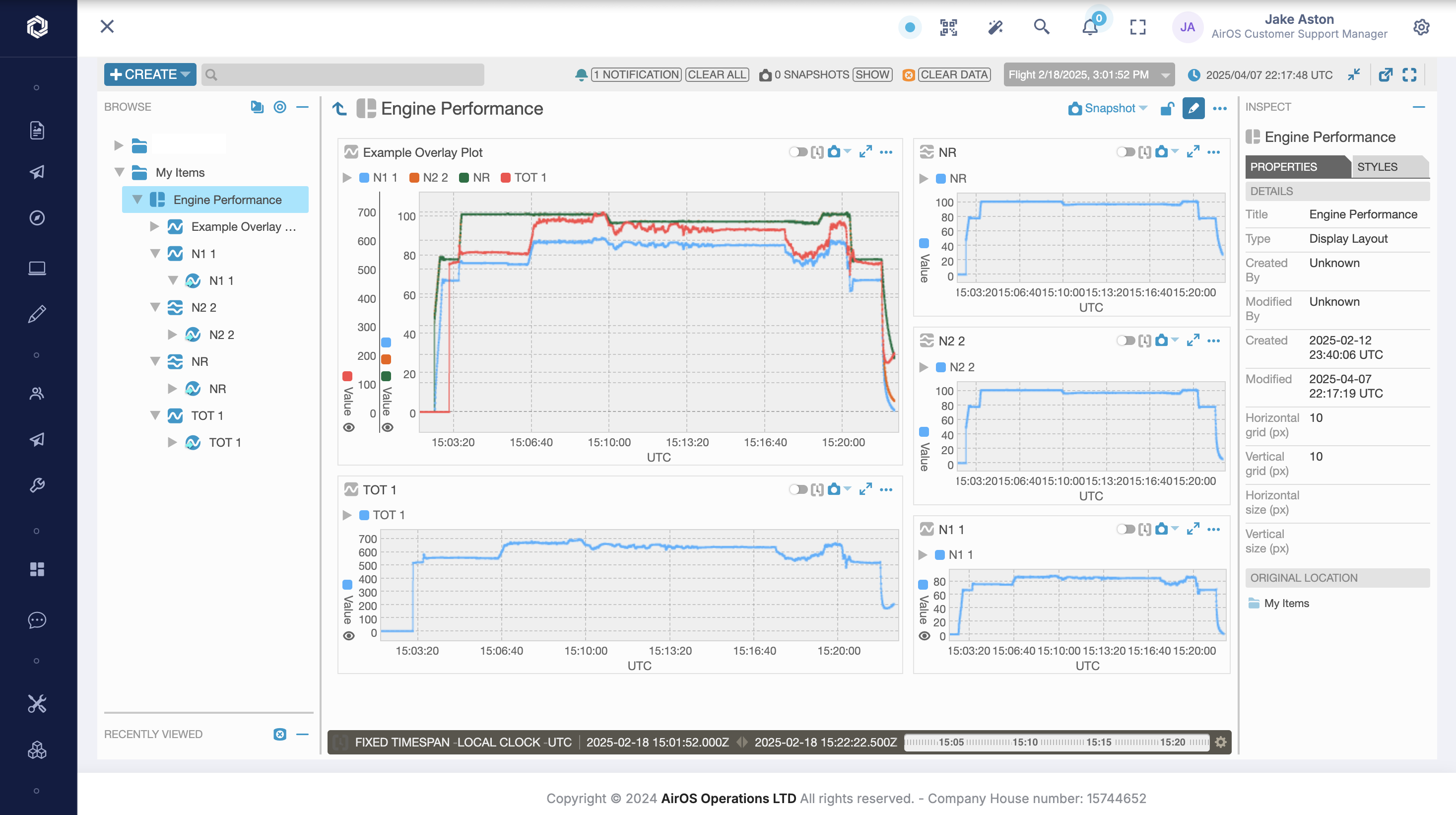
Visualise flights in the OpenMCT viewer, define computational parameters, set trends and alerts, and run analysis pipelines for baselines, features, forecasts, anomalies, and correlation — giving engineering and safety teams FDM insight before the aircraft lands.
Flight Data Monitoring links to aircraft records and reliability monitoring; it is not a substitute for stores — inventory remains in the Stores module.
Features
- Aircraft, Drones & Simulators & Plugins: Pull data from aircraft recorders, ArduPilot, DJI, X-Plane, MSFS, and other flight data connectors
- Flight Data Viewer: Live and historical flight data visualisation with flight time ranges
- Multi-Source Upload: Upload real-time and historical flight data from multiple sources
- Computational Parameters: Add calculated parameters that run beside raw recorded parameters
- Trend & Alert Engine: Set trends, triggers and alerts for early fault detection
- Analysis Pipelines: Baselines, features, forecasts, anomalies, and correlation jobs
- Helisafe Connector: Import flight data from Helisafe upload workflows